Studying Pi's LLM Module Design
Pi’s project has excellent LLM module design, especially its multi-provider approach, model configuration field design, and understanding of context. It considers context importance at the design level.
Pi is the foundational framework for both kimi-code and openclaw — worth studying carefully.
References:
- Pi’s LLM module core package: https://github.com/earendil-works/pi/tree/main/packages/ai
- “What I learned building an opinionated and minimalist coding agent”: https://mariozechner.at/posts/2025-11-30-pi-coding-agent/#toc_1
- “Stop using chat history as state storage for agents”: https://blog.raed.dev/posts/agentic-workflows-are-not-conversations/
1. Overall LLM Module Design
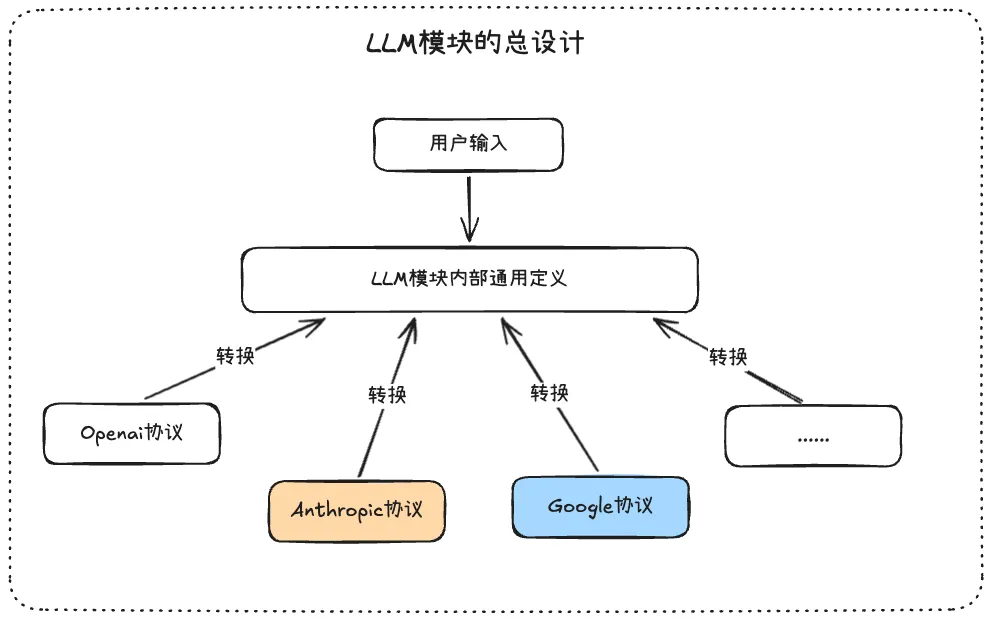
Pi’s coding Agent supports multiple providers and models, with mid-session model switching. Coordinating different protocols and message formats is the core design intent of the pi-ai module:
- Pi defines its own internal universal message types — all user messages are first converted to this universal format as the core of message flow
- When users input, they pass provider and model info. Based on this, the universal definition is converted to the target protocol format, then calls the model. Responses are converted back to universal format. Next input with a different model? Same conversion flow.
Key insight: regardless of how many models, providers, or API protocols exist — just focus on the internally defined universal format and perform temporary conversions when needed.
2. Internal Universal Definitions
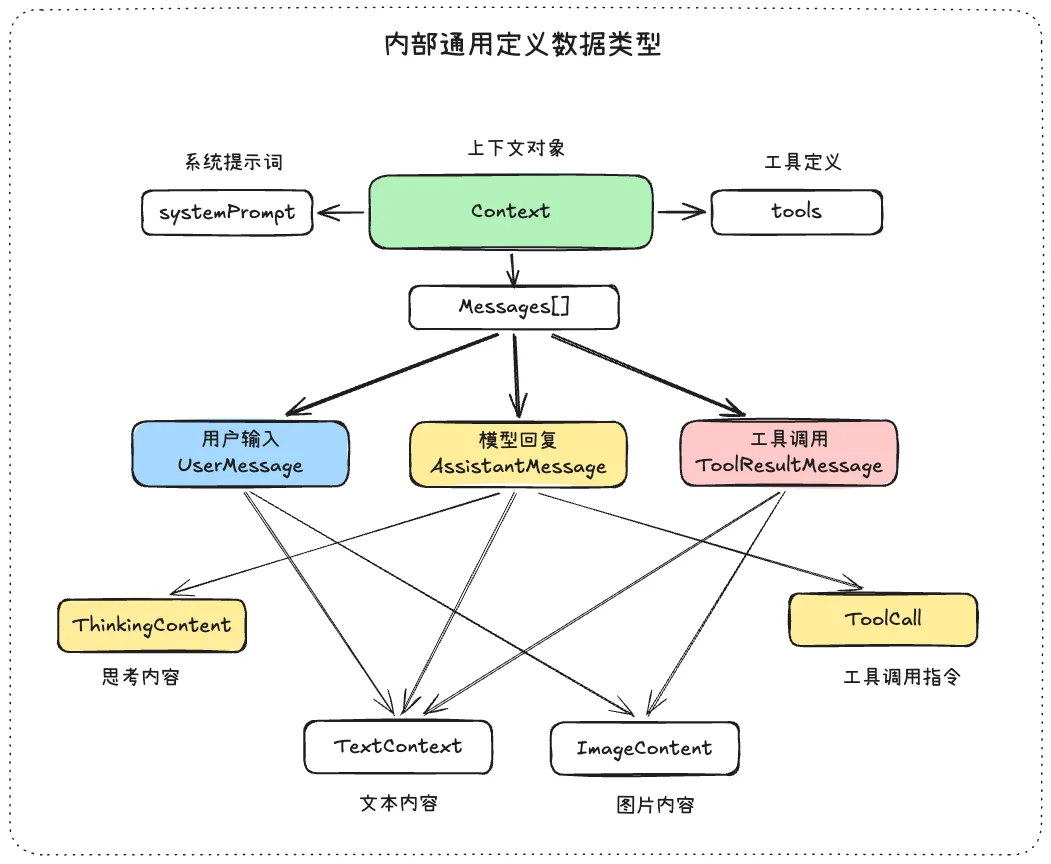
In a mature Agent loop, messages have different roles that give the message list a cyclical flow: user, assistant, toolResult. A complete Context object example:
const context: Context = {
    systemPrompt: "You are...",
    tools: [],
    messages: [
      { role: "user", content: "What's the weather in Beijing?" },
      {
        role: "assistant",
        content: [
          { type: "thinking", thinking: "...", thinkingSignature: "eyJhbGciOi..." },
          { type: "text", text: "Let me check for you." },
          { type: "toolCall", id: "call_01ABC", name: "get_weather", arguments: { city: "Beijing" } },
        ],
      },
      {
        role: "toolResult", toolCallId: "call_01ABC", toolName: "get_weather",
        content: [{ type: "text", text: "Sunny, 25°C, NE wind level 3" }],
      },
      {
        role: "assistant",
        content: [{ type: "text", text: "Beijing is sunny today, 25°C — great for going out!" }],
      },
    ],
  };
The internal currency is Context, which can carry additional data state. As the article “Stop using chat history as state storage” explains:
Your app has structured state: current user, selected project, process position, database data. But the LLM only has a 1D message array. The two continuously diverge, and only you can reconcile them.
Context objects serve as the universal message format with fields for state representation and control flow. When injecting context into a model, temporary format conversion adapts to the target API protocol. Adding new providers only requires new conversion functions — nothing else changes. Context is the source of all messages.
3. Message Data Flow
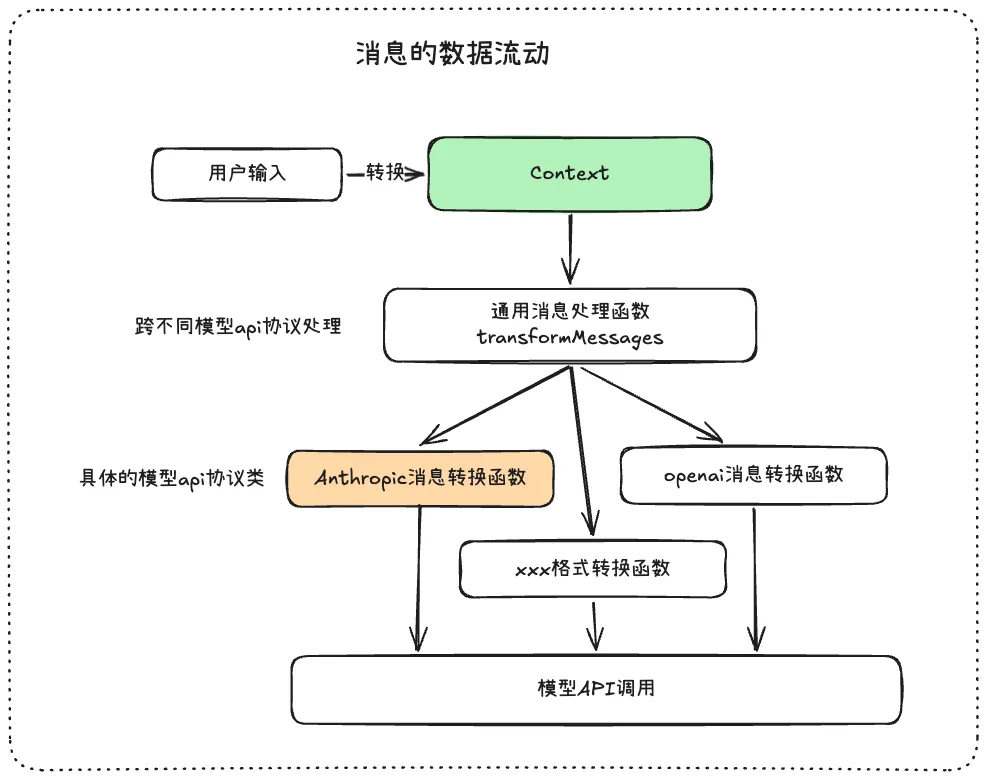
Universal message processing function: Handles anomalous tool messages and filters error/abort messages — making messages “healthier” before model input.
NOTEAnomalous tool messages: In the message variable, tool calls must appear in pairs — unpaired calls cause errors.
Message conversion function: Converts Context messages to provider-specific formats.
4. LLM Protocol Class Implementation
Specific API protocol class implementations (Anthropic, OpenAI Completions, Google) have five core methods:
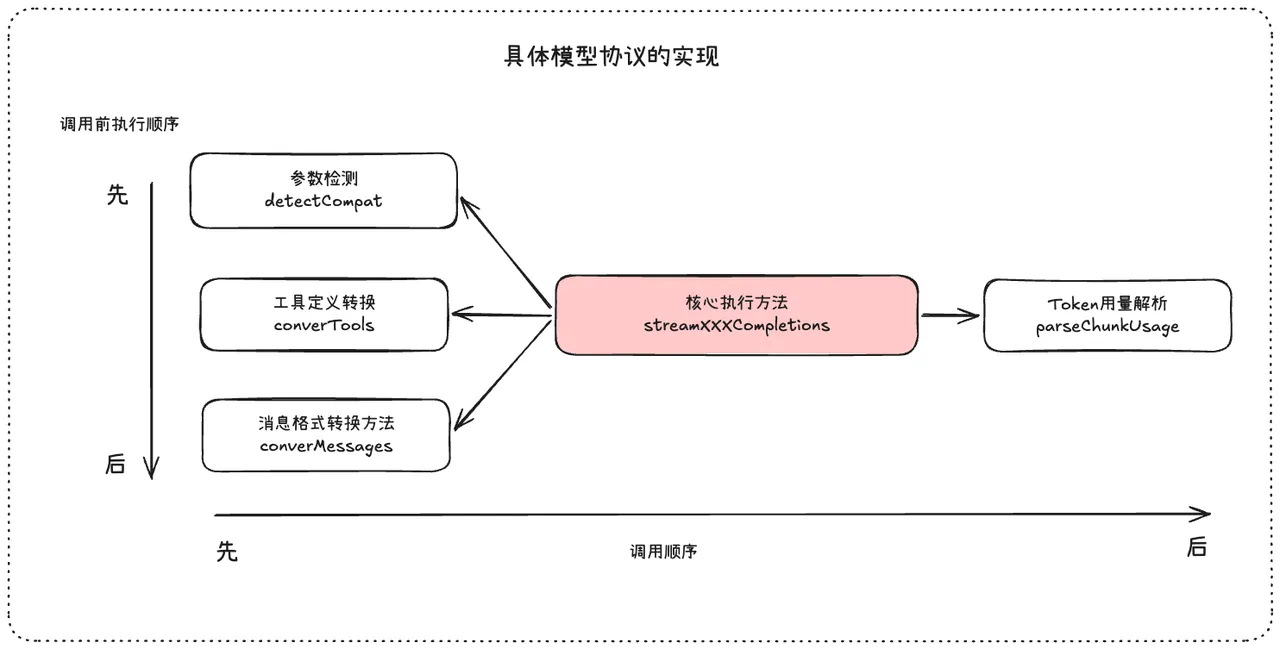
- Parameter detection: Auto-detect which parameters are supported based on model/provider
- Tool definition conversion: Convert tools to target LLM protocol format
- Message format conversion: Convert universal Context format to target protocol
- parseChunkUsage: Parse tokens from model output — input, cache, output, total
- streamXXXCompletions: Core execution method calling the above four functions plus the corresponding SDK
5. Core Utility Class
The EventStream class is beautifully designed:
export class EventStream<T, R = T> implements AsyncIterable<T> {
    private queue: T[] = [];
    private waiting: ((value: IteratorResult<T>) => void)[] = [];
    private done = false;
    private finalResultPromise: Promise<R>;
    private resolveFinalResult!: (result: R) => void;

    constructor(
        private isComplete: (event: T) => boolean,
        private extractResult: (event: T) => R,
    ) {
        this.finalResultPromise = new Promise((resolve) => {
            this.resolveFinalResult = resolve;
        });
    }

    push(event: T): void {
        if (this.done) return;
        if (this.isComplete(event)) {
            this.done = true;
            this.resolveFinalResult(this.extractResult(event));
        }
        const waiter = this.waiting.shift();
        if (waiter) {
            waiter({ value: event, done: false });
        } else {
            this.queue.push(event);
        }
    }

    // ... end(), asyncIterator, result() methods
}
Two key design decisions:
- queue and waiting: Queue stores events when consumers aren’t ready; waiting resolves immediately when consumers are waiting
- result() and Generator: Async generator for streaming consumption; result() blocks until model output completes
6. Event Stream and Call Chain
6.1 Agent Execution Event Stream
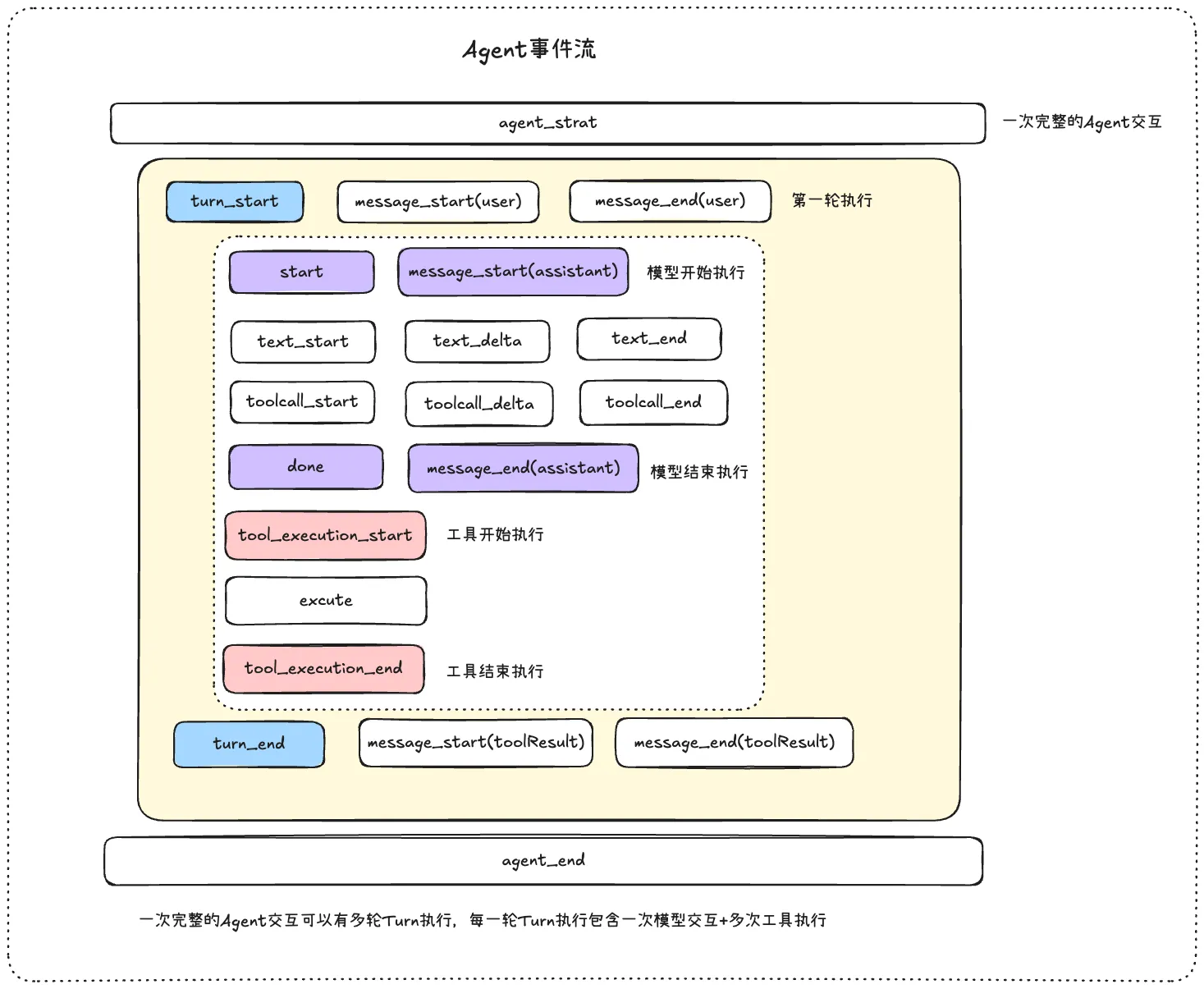
A complete Agent event stream includes lifecycle events, turn execution, message input, model execution, tool execution, termination, and error states.
Key understanding: One Agent interaction may involve multiple model calls (multiple turns). Each turn has a model response, and if the response includes tool calls, that turn also includes tool execution.
6.2 Agent Execution Chain
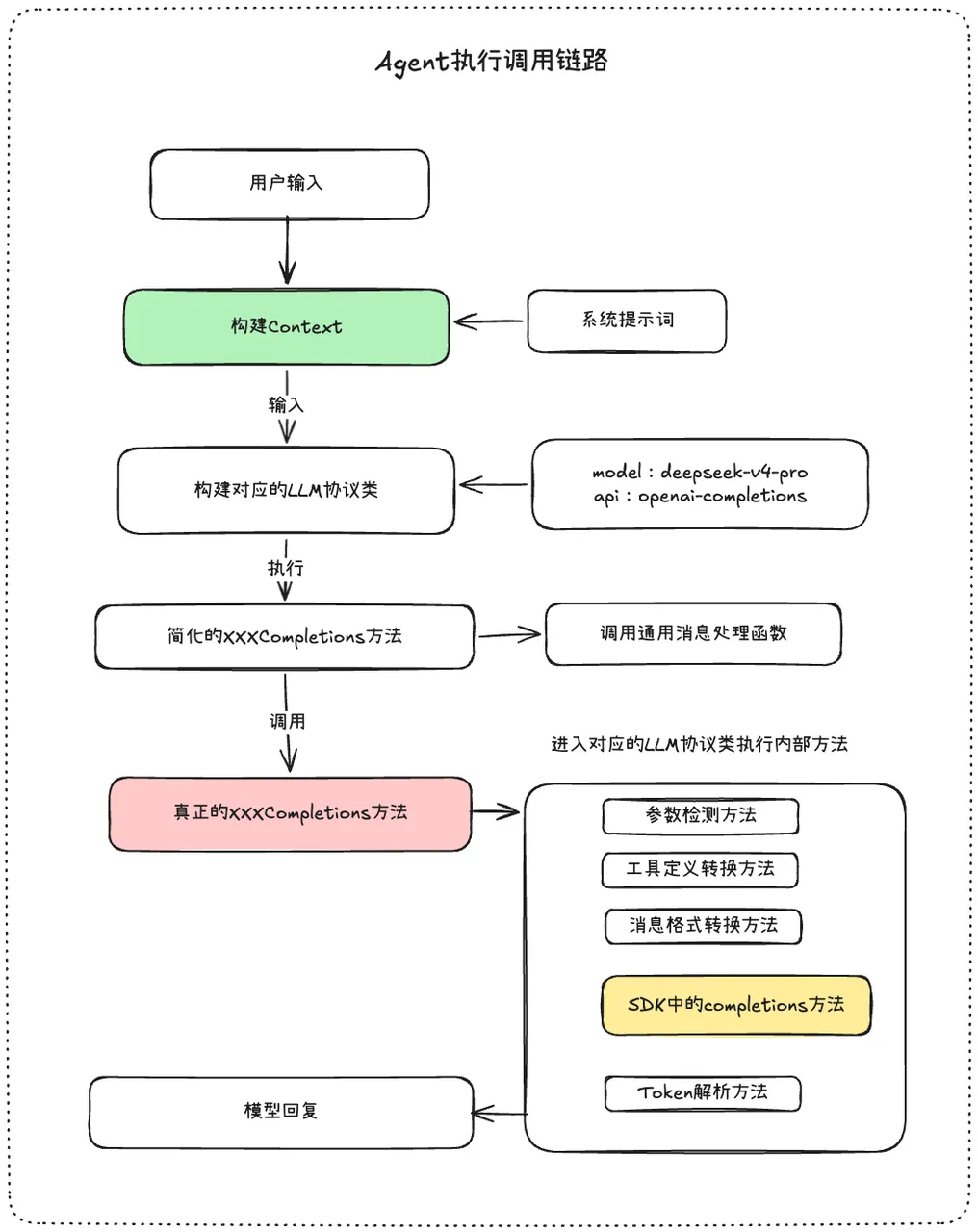
Two key points:
- Select which LLM protocol class to instantiate based on the model’s API variable value
- Perform parameter and message format conversion for successful model invocation