Agent File System Search: Grep and Glob Tools
2 min
1. Glob Tool Implementation
The glob tool has a fallback strategy for efficiency and resource optimization:
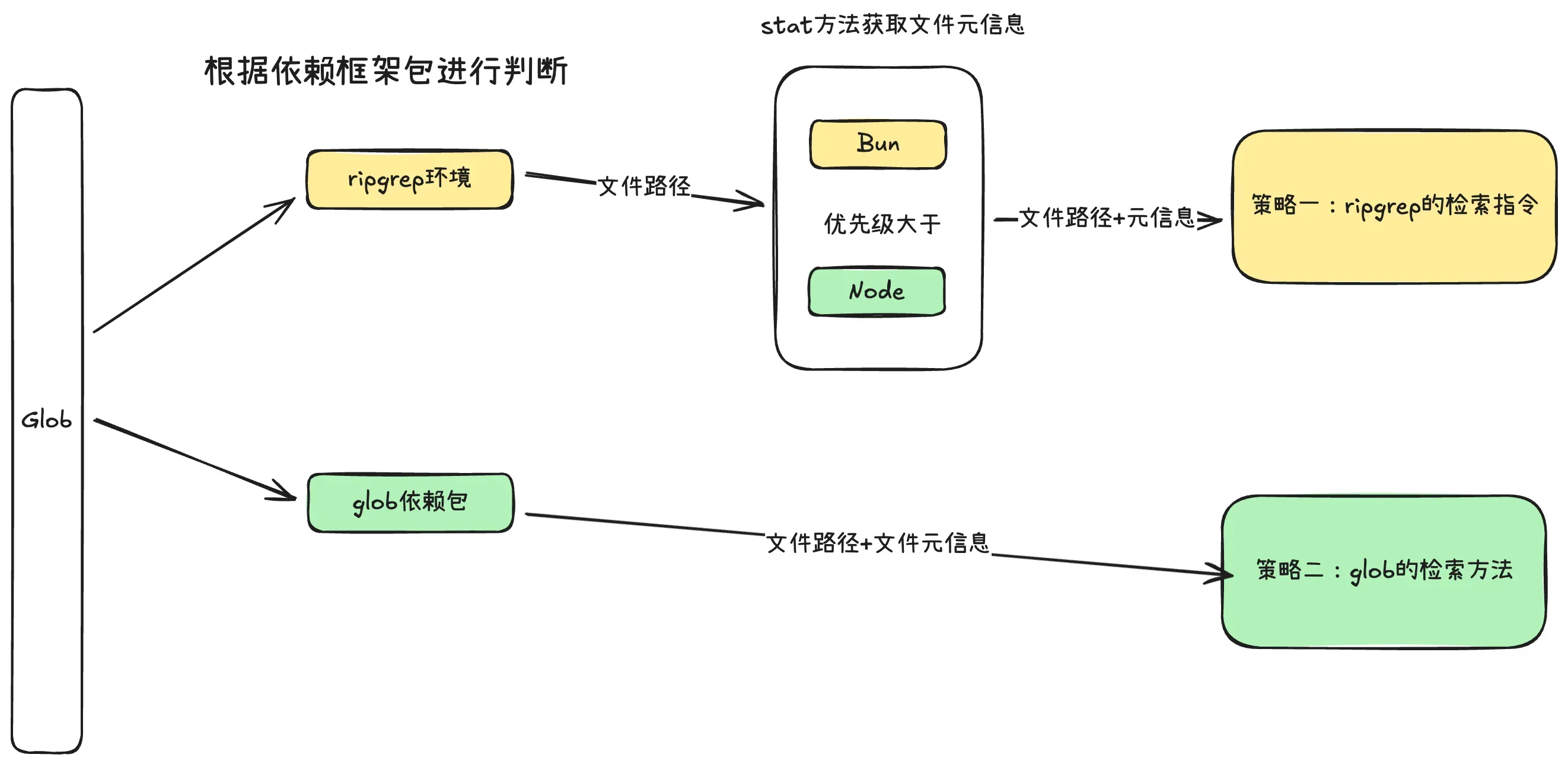
Two implementation approaches with different strengths:
- glob package: Returns complete file information (metadata like size, modification time) — no extra operations needed. Native to Node.js.
- ripgrep: Returns only file paths without metadata — requires additional
statcalls. But ripgrep searches faster (Rust implementation, loads a binary at runtime).
Total execution time formula: Total = Search time + N × Per-file processing time
- glob package: per-file processing is negligible, so search time ≈ total time
- ripgrep: faster search time but adds per-file stat call overhead
Recommendations:
- For development convenience: Use glob directly — faster development, no external dependencies
- For search efficiency: Consider ripgrep — if you’re implementing grep too, ripgrep is the natural choice for both
- For stability: Use fallback strategy — try ripgrep first, fall back to glob if ripgrep isn’t available or download fails
2. Grep Tool Implementation
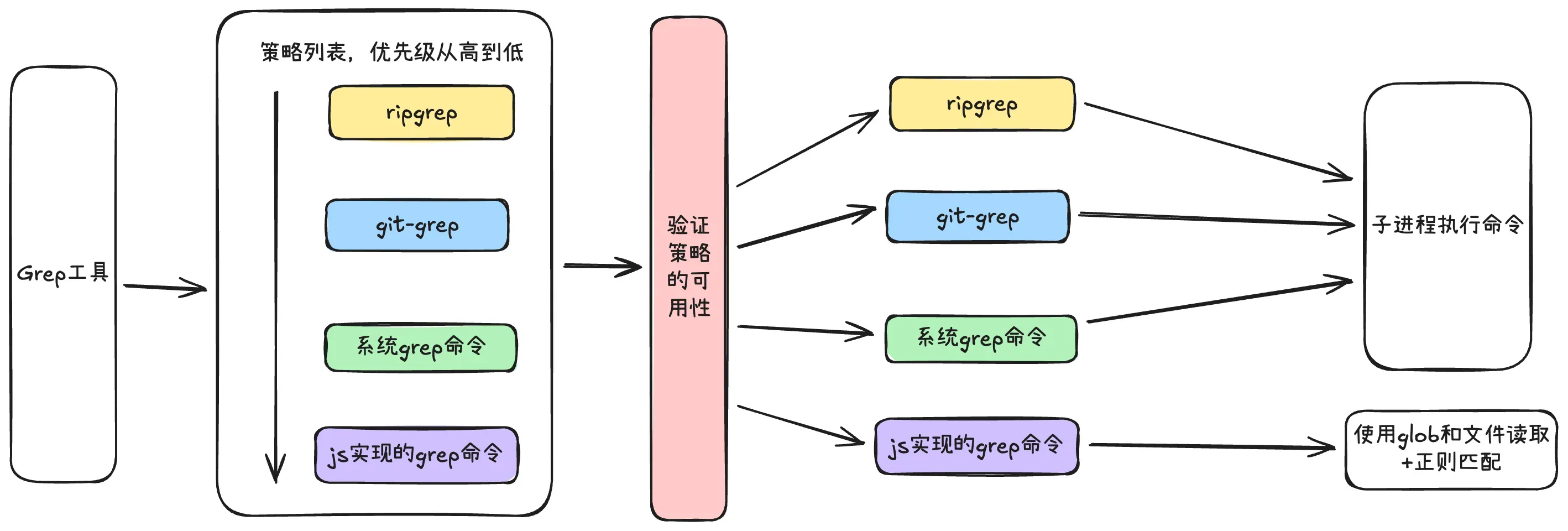
Four implementations in priority order with fallback strategy:
- ripgrep: Rust binary — extremely fast search
- git grep: Reads from
.git/indexcached file list, skips expensive directory traversal - System grep: Traditional C implementation, single-threaded recursive search — available on most Unix systems but not Windows
- JS grep: Pure JS implementation as last resort — uses glob for file listing, reads each file, regex matches line-by-line. Slowest.
3. Ripgrep Auto-Download Mechanism
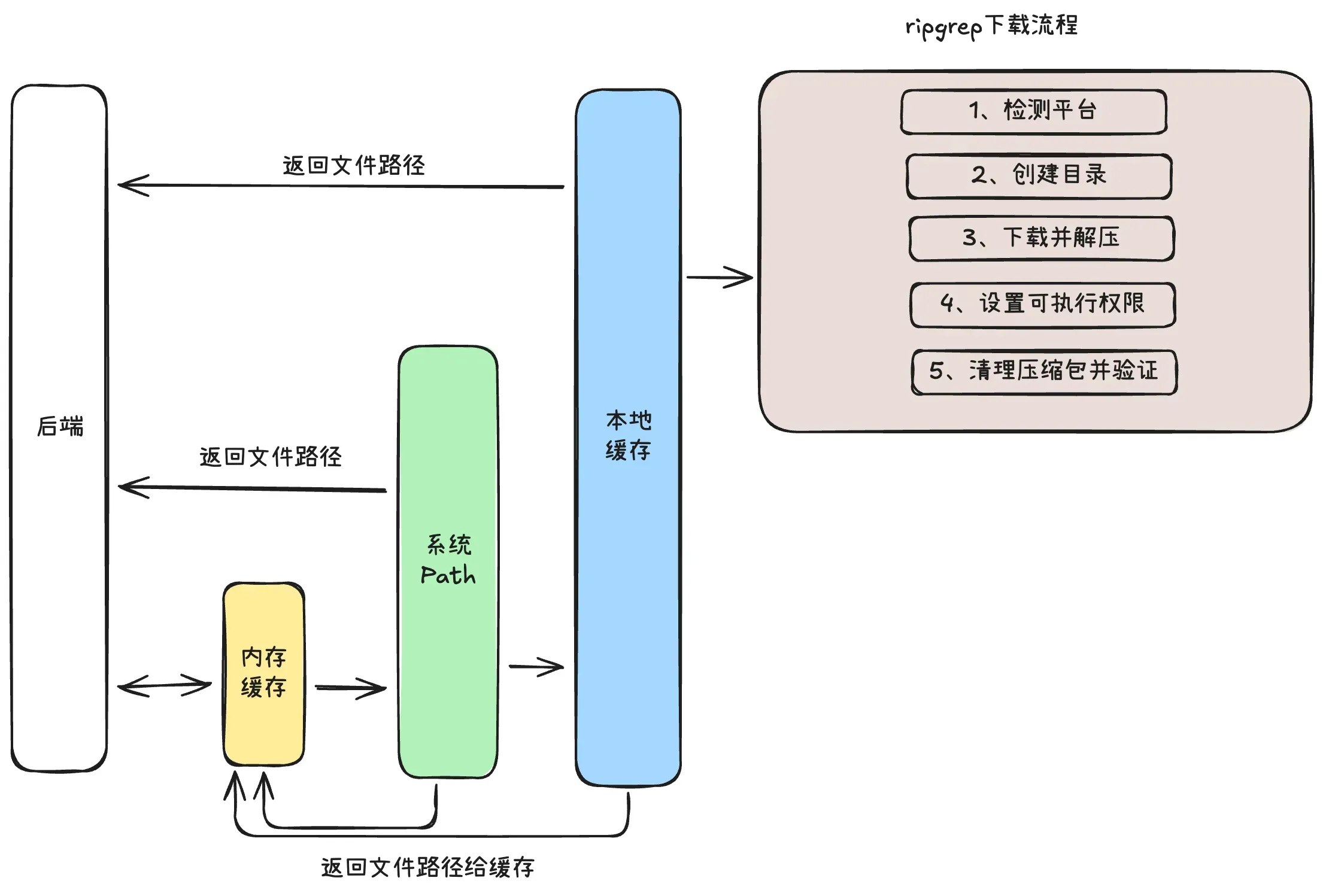
Ripgrep commands need the full binary path for Node.js spawn:
async function grepWithRipgrep(pattern, cwd, options) {
  const rgPath = await Ripgrep.filepath(options.binDir);
  // Returns: /usr/bin/rg or ~/.reason/bin/rg
  const proc = spawn(rgPath, ['--line-number', '--no-heading', pattern], { cwd });
}
Path resolution strategy:
- Check memory cache — return if found
- Check system installation — return and cache if found
- Check local binary path — if found, cache and return; if not, download to appropriate directory
4. Timeout Control
Using AbortController/AbortSignal in Node.js for timeout control:
- AbortController: The controller that sends “cancel” signals
- AbortSignal: The signal passed to async operations, enabling cancellation
Three-step implementation:
Step 1: Create timeout signal function
export function createTimeoutSignal(
  timeoutMs: number,
  externalSignal?: AbortSignal
): { signal: AbortSignal; cleanup: () => void; isTimeout: () => boolean } {
  const controller = new AbortController();
  let timedOut = false;

  const timeoutId = setTimeout(() => {
    timedOut = true;
    controller.abort();
  }, timeoutMs);

  const abortHandler = () => {
    clearTimeout(timeoutId);
    controller.abort();
  };
  externalSignal?.addEventListener('abort', abortHandler, { once: true });

  const cleanup = () => {
    clearTimeout(timeoutId);
    externalSignal?.removeEventListener('abort', abortHandler);
  };

  return { signal: controller.signal, cleanup, isTimeout: () => timedOut };
}
Step 2: Create async operation wrapper
export async function withTimeout<T>(
  promiseFactory: (signal: AbortSignal) => Promise<T>,
  timeoutMs: number,
  operation: string,
  externalSignal?: AbortSignal
): Promise<T> {
  if (externalSignal?.aborted) throw createAbortError();

  const { signal, cleanup, isTimeout } = createTimeoutSignal(timeoutMs, externalSignal);

  try {
    const result = await promiseFactory(signal);
    cleanup();
    return result;
  } catch (error) {
    cleanup();
    if (isTimeout() && isAbortError(error)) {
      throw createTimeoutError(operation, timeoutMs);
    }
    throw error;
  }
}
Step 3: Pass cancel signal to async process
await withTimeout(
  (signal) => spawnAsync('long-command', [], { signal }),
  5000,
  'command execution',
  userCancelSignal
);