One of DSH's Treasures: The Design of Session Persistence
1. Session Persistence Events
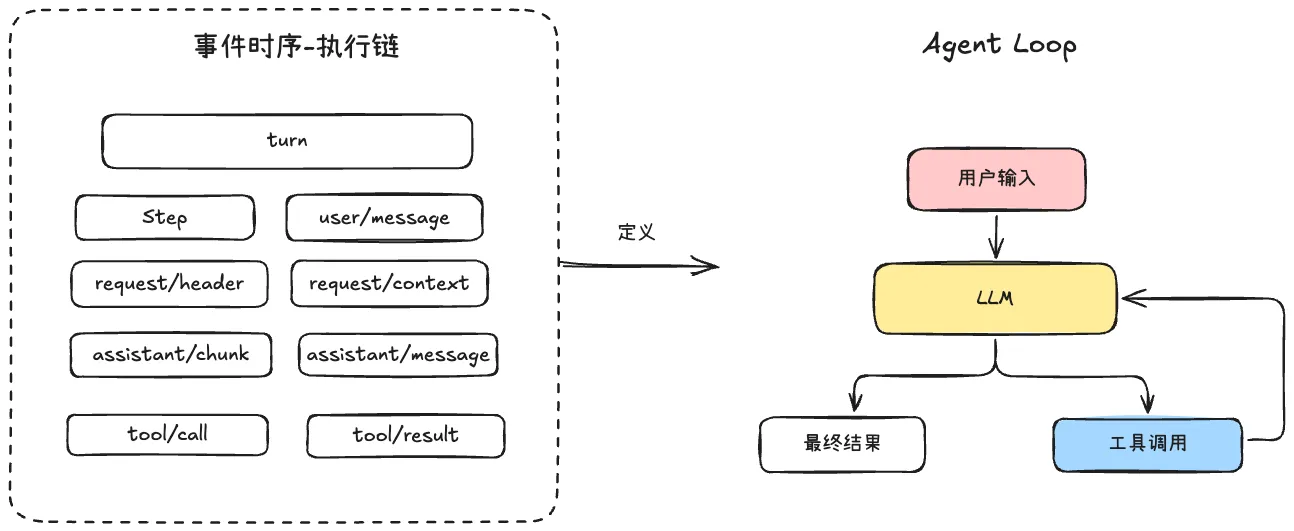
Before walking through the actual execution order, let’s first look at some fairly interesting design ideas.
The first interesting design is in the user/message event. Messages come from two sources: direct user input and context injected by plugins.
Plugins have two ways to send context into user/message: one is to inject a UserMessage directly via inject; the other is to register dynamic context via systemPrompt.context, which the Agent injects when it assembles the system prompt before sending messages to the LLM.
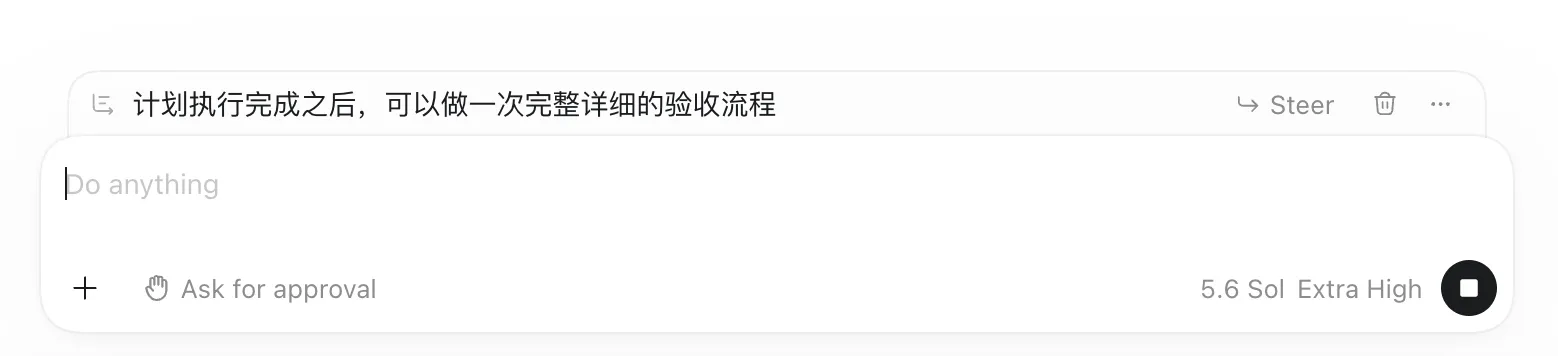
User input has three injection modes: followup, steer, and inject.
followup means the message enters on the next turn — it goes into the message queue and waits, just like in the figure above.
steer means a message supplement that enters the next step, similar to sending a message in Codex and then pressing Command+Enter to force a message into the running execution flow.
inject is similar to steer; the only difference is that inject is silent and does not actively wake the Agent, whereas followup and steer wake the Agent immediately after entering the queue.
The second interesting design: when assistant/message outputs a tool-call instruction, it is very similar to the content of tool/call. So why define a separate tool/call? Why not just pair assistant/message directly with tool/result?
I think it is better understood from a design perspective. assistant/message represents the model-output node, while tool/call is the precondition for tool execution. Without tool/call, the Agent’s execution chain would be very “implicit”, with the complexity hidden behind the code. Splitting it out explicitly adds a node, but makes the chain clearer.
Of course, once there is a tool/call, the tool’s execution timestamp is independent, crash recovery is traceable, and paired tool/call and tool/result entries also reduce the chance of model calls failing because of malformed messages.
The third interesting design, I think, is request/header. Its detailed format is as follows:
export interface EpochHeader {
  config: LlmCallConfig
  adapterDefaults?: LlmCallConfigAdapterDefaults
  system?: string
  tools?: ToolSchema[]
}
export interface LlmCallConfig {
  provider: string
  model: string
  reasoningEffort?: ReasoningEffortId
  temperature?: number
  maxTokens?: number
  stop?: string[]
}
It puts in the system prompt and all tool definitions, and also adds the model configuration. Apart from the messages, it is almost a complete record of the parameters of one LLM request.
Once this is recorded in the log, it is not written on every request. It is only appended to the session persistence file when the information in it changes; otherwise, multiple LLM requests all read the same content.
Now let’s look together at how these events are ordered across the entire Agent Loop.
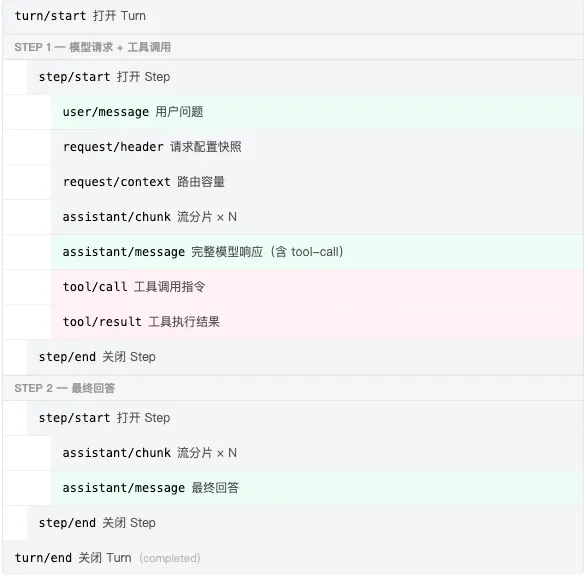
2. Plugin Extension Point Events
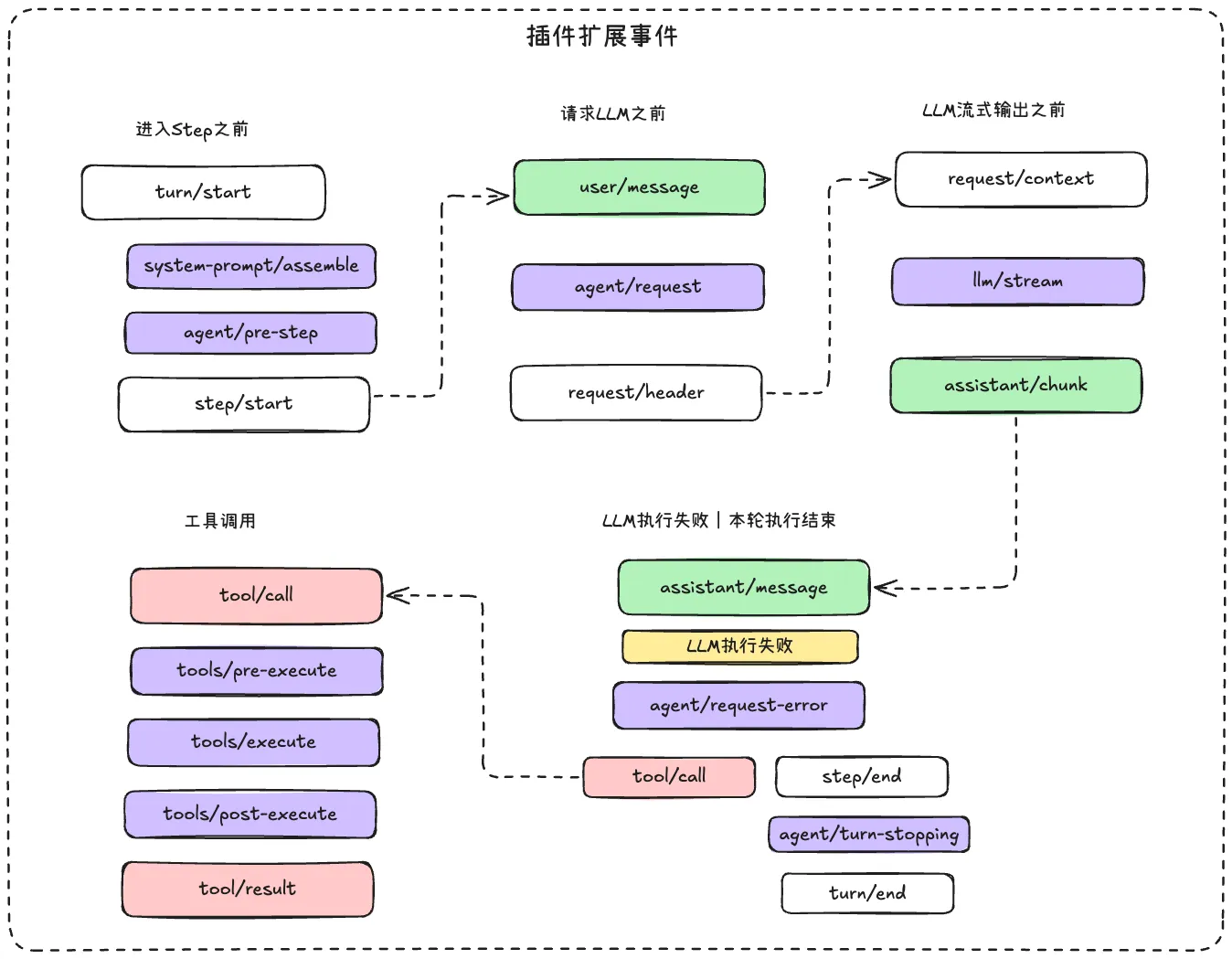
DSH’s design principle is “everything is a plugin”, so it provides plugin extension points throughout the Agent Loop execution chain.
When users create a plugin, they can change the execution chain and the Context simply by subscribing to the corresponding plugin events, which is very convenient. Next, let’s go through each event extension point in detail.
system-prompt/assemble: a waterfall-mode event where you can assemble the system prompt, dynamic context, and tool list. Most of the events below are waterfall-mode events with a next function.agent/pre-step: this is the execution gate. It decides whether to enter the Step and with what messages. If it ultimately returns a reject type here, the whole execution is interrupted and ends, going straight to turn/end.agent/request: plugins can change the model provider, model, and some configuration parameters here. It cannot modify messages.llm/stream: plugins can wrap or replace it with a custom streaming iterator.agent/request-error: recovery after a failed model request; the model’s retry process is usually controlled here.tools/pre-execute: this is the permission check before tool execution, with three return values: allow, deny, and ask. If a plugin wants to take over the tool permission module, it can inject the relevant information here.tools/execute: it wraps the actual tool execution function, where you can add things like timeouts and retries.tools/post-execute: you can operate on the tool result and decide in what form the tool result is handed to the model, so plugins can replace content or add markers here.agent/turn-stopping: the last chance before the Turn closes. This is the only serial-mode event.
3. Notification Events
DSH has quite a lot of notification events — probably around 13, all in emit mode. For now I’ll only go through the 5 notification events related to the main execution chain; those who are interested can dig deeper into the DSH source code.
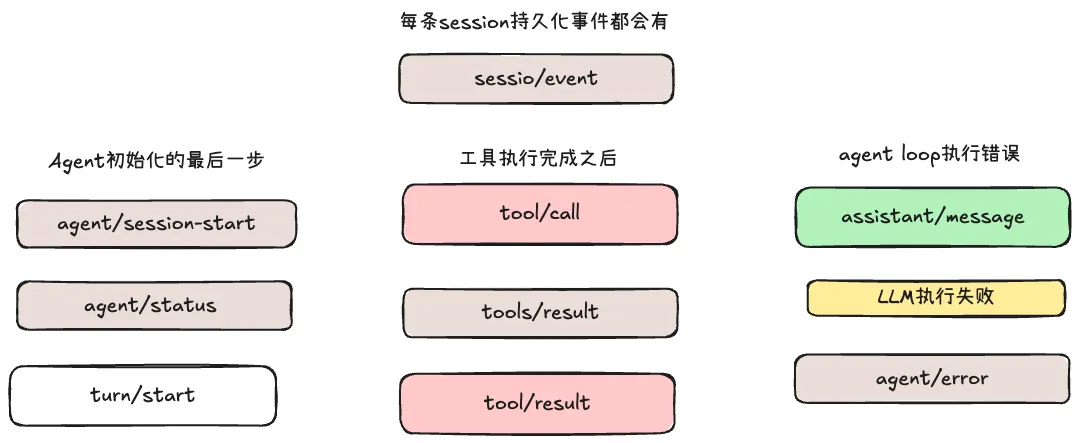
Subscribing to the agent/session-start event gives you complete information about the Agent object and its startup information. agent/status is used to get whether the current Agent state is finished or running, and it can also get the complete Agent object.
The tools/result event gets the complete information in the tool execution chain, including the tool execution result and the tool execution arguments — very comprehensive, but read-only, not modifiable.
agent/error gets fairly detailed error information from the Agent execution chain.
{
  agent: Agent,       // which Agent failed
  turn: number,       // in which Turn
  step: number,       // in which Step (0 if not running)
  error: unknown      // the error object itself
}
The role of session/event is that whenever a persistence event is written to session storage, it immediately notifies all subscriber functions. It can get the basic Session information and the complete written data, and is mainly used for pushing updates to the frontend display, or for driving recomputation of various statistics and projections.
4. Projection Use of Session Persistence Data
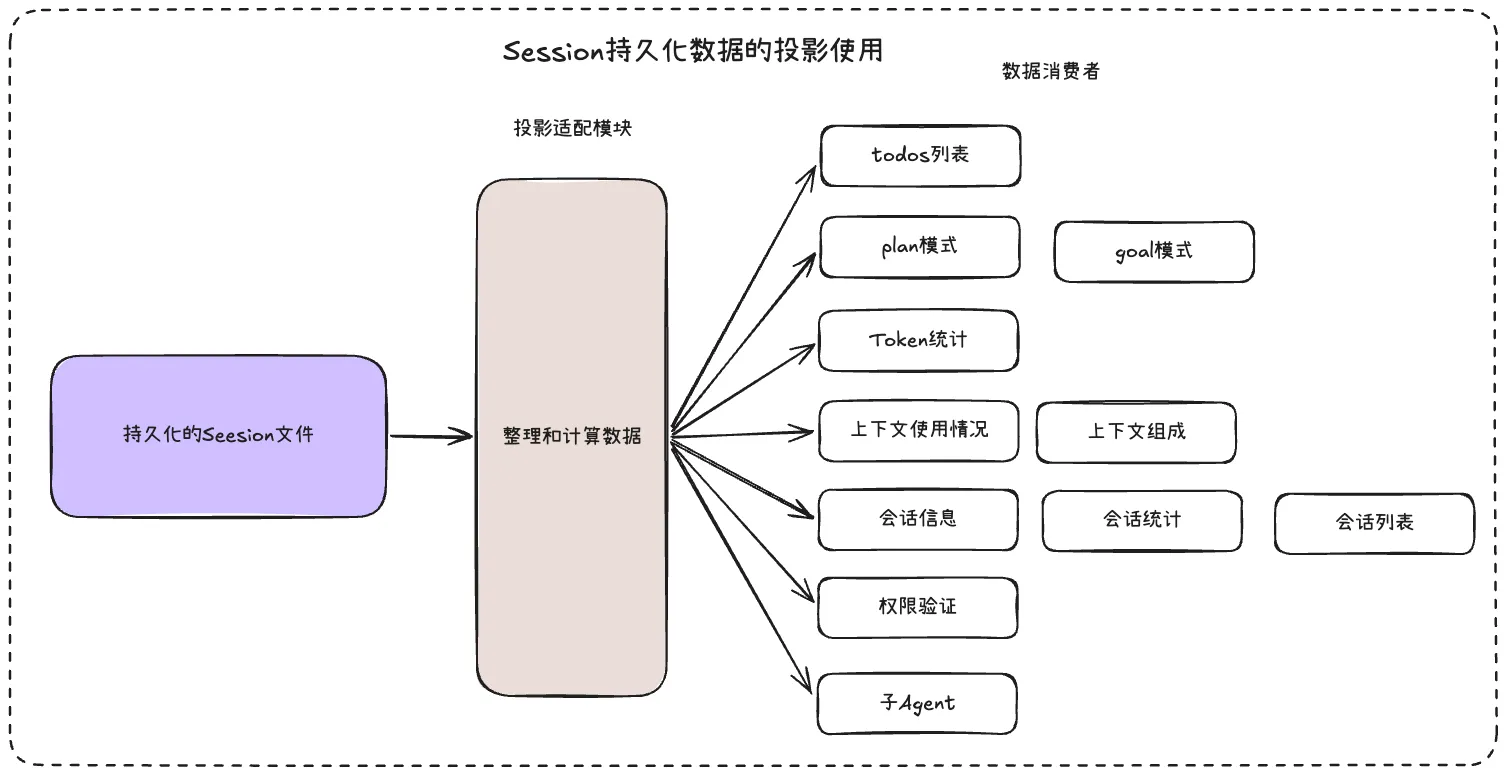
And the implementation in the adapter module is also very elegant: three functions determine all the operational behavior — the init function, the apply function, and the view function.
The init function is responsible for initializing the data structure, the apply function is responsible for how to compute and operate when an update arrives, and the view function controls which data is shown for the frontend to use.
This approach guarantees a true single source of truth — the session persistence file, which is something like the data foundation of an Agent. The Agent’s context is determined by this data source. The frontend’s display behavior is a projection and cannot be treated as a core consideration for Agent self-evolution, so projection display is designed as a “read-only operation”, and the raw data for all projection adapters comes from the same source.
When I first started exploring this, I thought of treating the Agent’s context as the most core thing in the whole Harness, with everything else being display operations — putting development focus on the moment the Agent reads its context, that is, what this Session persistence file should contain and how it should be designed. It’s a bit like context driving the startup of the whole Harness.