Context Compression Prompts: ClaudeCode and Gemini Compression Strategies
Preface
Compression means summarizing conversations approaching context window limits and reinitializing a new context window. The core is distilling key content so the Agent can continue with minimal performance degradation.
IMPORTANTThis article focuses on compression prompts — the instructions telling the LLM how to compress and what key information to retain. This follows the compression dispatch phase.
References:
- ClaudeCode reverse engineering: https://github.com/shareAI-lab/analysis_claude_code
- gemini-cli: https://github.com/google-gemini/gemini-cli
- “Effective context engineering for AI agents”: https://www.anthropic.com/engineering/effective-context-engineering-for-ai-agents
- “Managing context on the Claude Developer Platform”: https://www.anthropic.com/news/context-management
1. LLM Compression — ClaudeCode’s Prompt
Claude’s team shared that ClaudeCode directly uses the model for summarization:
In Claude Code, we implement this by passing the message history to the model to summarize and compress the most critical details. The model preserves architectural decisions, unresolved bugs, and implementation details while discarding redundant tool outputs or messages.
The /compact command prompt instructs the model to create a detailed summary covering these 8 sections:
- Primary Requests and Intent: All explicit user requests
- Key Technical Concepts: Important technologies, frameworks discussed
- Files and Code Sections: Specific files examined, modified, or created — with code snippets
- Errors and Fixes: All errors encountered and how they were fixed
- Problem Solving: Resolved issues and ongoing troubleshooting
- All User Messages: Non-tool user messages for understanding intent changes
- Pending Tasks: Outstanding tasks explicitly requested
- Current Work: Specific work in progress before the summary request
- Optional Next Steps: Next steps related to recent work
The prompt uses XML format (Claude models are trained extensively on XML tags) and an <analysis> block for structured thinking before the final summary.
Why these 8 directions?
- Technical Context: Rebuilding the development environment
- Project Overview: Understanding global architecture
- Code Changes: Recording specific work outputs
- Debugging & Issues: Avoiding repeating mistakes
- Current Status: Tracking task progress
- Pending Tasks: Maintaining task continuity
- User Preferences: Working memory about the project
- Key Decisions: Preserving decision history
After LLM generates the summary, add an opening statement: “Context has been compressed using structured 8-section algorithm. All essential information has been preserved for seamless continuation.”
2. LLM Compression — Gemini’s Prompt
Gemini-cli also uses LLM summarization but differs in key information retention and invocation:
- Only 5 key information categories
- Uses “scratchpad” chain-of-thought to enhance extraction
Gemini’s prompt instructs the model to first think in a private <scratchpad>, then generate a <state_snapshot> XML with:
- Overall Goal: User’s high-level objective
- Key Knowledge: Critical facts, conventions, and constraints
- File System State: Files created, read, modified, or deleted
- Recent Actions: Summary of recent agent operations and results
- Current Plan: Step-by-step plan with completion markers
3. Context Compression — Tool Message Trimming
Instead of LLM-based compression, this strategy cleans tool inputs and outputs directly:
Context editing automatically clears stale tool calls and results from within the context window when approaching token limits, effectively extending how long agents can run without manual intervention.
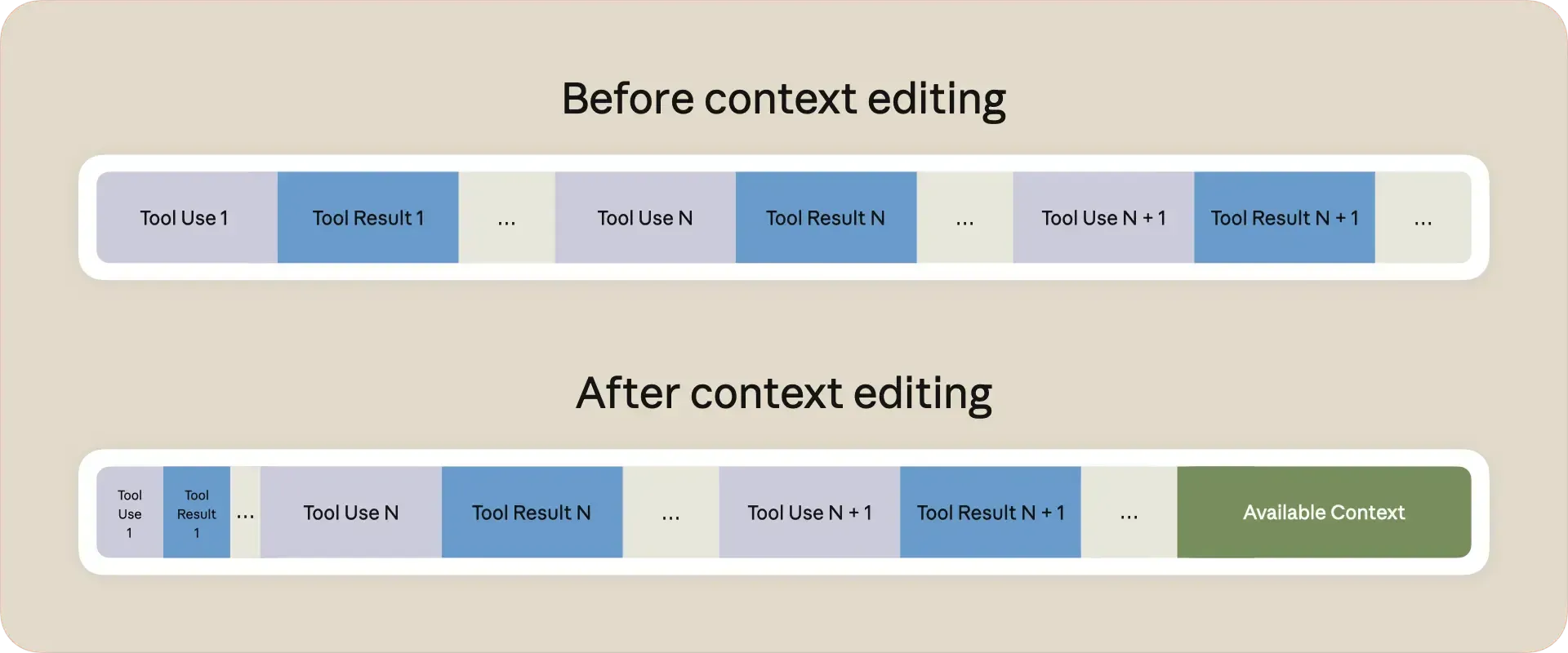
In most Agent interactions, tool outputs (especially read tools) consume the most context. User inputs and model outputs are relatively small. Prioritizing tool-related context removal is reasonable.
Implementation approach:
- Filter tool inputs and outputs from history
- Decide whether to remove all or keep the last N tool call rounds
- Produce optimized context
The code identifies “tool rounds” (assistant message with tool_calls + corresponding tool result messages), keeps the most recent N rounds, and removes the rest while preserving all non-tool messages.
Following Cursor’s approach: when providing summaries, also provide a history file location so the Agent can search for details not included in the summary.
4. Context Compression — Middle vs Oldest Strategy Selection
An elegant compression approach that uses algorithmic judgment rather than LLM compression — more controllable but more complex to develop.
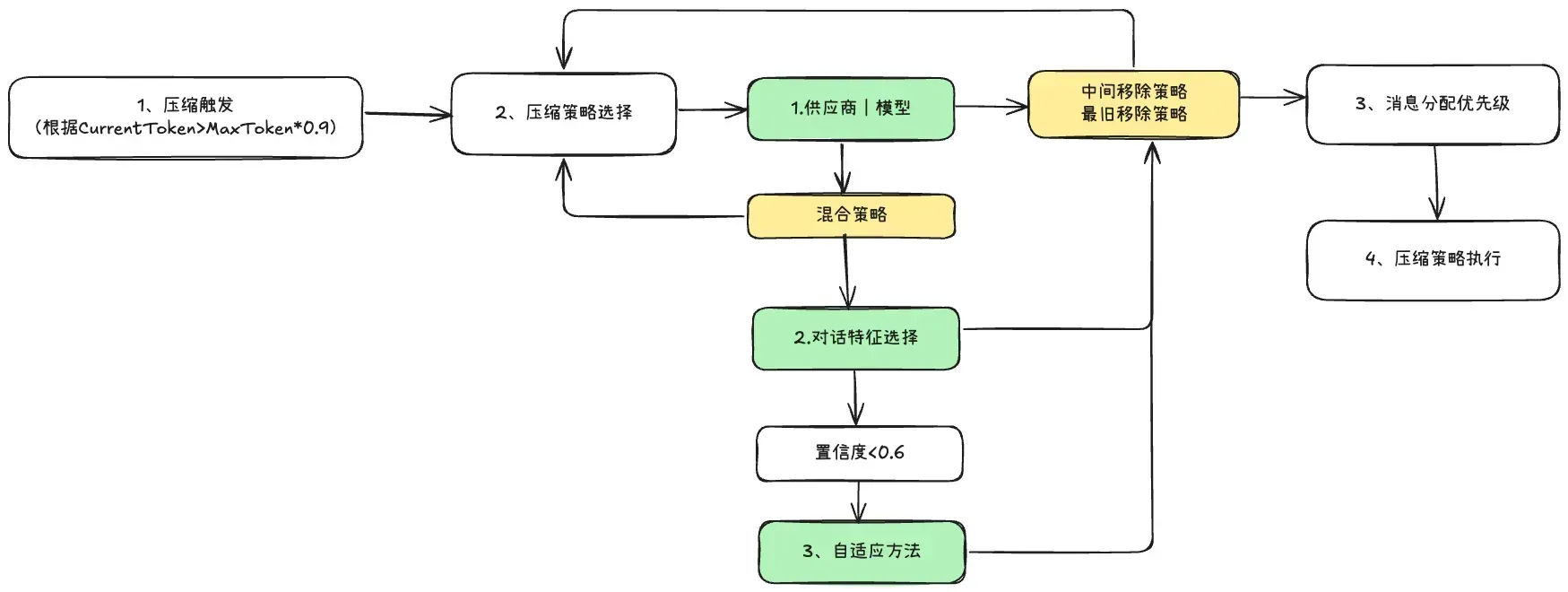
Three removal strategies:
- Middle removal: Keep beginning and end, remove middle messages
- Oldest removal: Prioritize removing oldest messages, keep newer ones
- Hybrid: Intelligently combine both strategies
4.1 Strategy Selection Method
Three-layer selection:
- First layer: Based on provider/model
- Second layer: Based on conversation characteristics
- Third layer: Confidence judgment
4.2 Provider/Model-Based Selection
| Provider | Model | Strategy | Reason |
|---|---|---|---|
| OpenAI | GPT-4 | Hybrid | Balanced start/end retention |
| OpenAI | O1 | Middle removal | Higher retention for context-hungry models |
| Anthropic | All | Oldest removal | More end-message retention |
| 1.5 | Middle removal | Large context, conservative compression | |
| LMStudio/Ollama | All | Hybrid | Small context, aggressive compression |
4.3 Conversation Characteristics-Based Selection
Only triggered when the first step outputs “hybrid.” Analyzes: total messages, average message length, compression ratio, recent message token ratio, presence of long/system/tool messages, and compression severity (light >80%, moderate >60%, heavy ≤60%).
Rules:
- Light compression + short conversation → Middle removal (confidence: 0.8)
- Heavy compression + long conversation → Oldest removal (confidence: 0.9)
- High recent message ratio → Middle removal (confidence: 0.7)
- Long messages + significant compression → Oldest removal (confidence: 0.6)
- Tool or system messages present → Middle removal (confidence: 0.7)
4.4 Adaptive Strategy Selection
When confidence drops below 0.6, the system runs both strategies and calculates efficiency scores:
Efficiency = Token reduction (60% weight) + Message preservation (40% weight)
Example: 15 messages, 9000 tokens, target 6000:
- Middle removal: 6200 tokens, 12 messages kept → efficiency 0.5066
- Oldest removal: 5800 tokens, 10 messages kept → efficiency 0.4804
Middle removal wins despite less token reduction, because it preserves more messages. The system balances both objectives to select the optimal strategy.