Bash Tool Implementation and Security Permission Design
1. Bash Tool Implementation
The Bash tool is a critical foundational Agent tool — Skill scripts need it, and as applications become increasingly CLI-based, future Agent external application calls will need it too.
While the Bash tool enables many operations and can simplify the Agent’s tool list, maintain the principle of least privilege — use dedicated tools first (Read for reading, Edit for editing, etc.).
1.1 Tool Definition
Key parameters:
- command: Bash command string to execute
- timeout: Execution timeout to prevent Agent hangs
- description: Brief description rendered to users in UI
- run_in_background: For long-running commands (builds, server starts) — run in background, poll for results
- dangerouslyDisableSandbox: Security bypass strategy
- _simulatedSedEdit: Pre-computed sed results — on user approval, writes the result directly instead of re-executing sed, ensuring WYSIWYG
1.2 Execution Function
Three core design principles:
- Generator function for real-time output streaming
- Production-grade exec wrapper
- Content length checking — large outputs written to file, returning partial results + file path
Generator mode is superior to Promise mode: Generator yields intermediate states in real-time, while Promise requires waiting until completion with a blank period.
The exec wrapper provides:
- Output written to disk — only ~4KB preview in memory
- Active interruption via AbortSignal
- Timeout handling — auto-stop after 120s
- Merged stdout/stderr for consistent UI display timing
- CWD auto-recovery when the working directory is accidentally deleted
Output truncation: files under 128KB are returned inline; larger outputs get the first 128KB preview plus the full file path for on-demand reading.
1.3 Return Values
Key fields:
- returnCodeInterpretation: Semantic explanation of non-zero exit codes for better model reasoning
- persistedOutputPath: Large output file path — the model decides whether to read the full output based on context, rather than blindly injecting everything
- stdout: Core command output
1.4 Permission Verification Flow
The Bash tool has the broadest execution scope and highest risk. Verification includes:
- Command parsing
- Static rule checking
- Permission verification
- Model verification
- Container verification
Static rule checking (24 rules) and permission verification (three-tier results) are the core. Most uncertain cases output “ask” mode for user confirmation.
1. Command Parsing
Use tree-sitter to parse Bash commands into structured ASTs:
import { Language, Parser } from 'web-tree-sitter';

async function main() {
  await Parser.init();
  const lang = await Language.load('./tree-sitter-bash.wasm');
  const parser = new Parser();
  parser.setLanguage(lang);

  const command = 'grep -r "foo" . && cat file.txt | wc -l';
  const tree = parser.parse(command);
  // Walk AST, extract commands and argv...
}
2. Core 8 Static Checks
2.1 Control Character and Unicode Whitespace Rejection
Pre-parsing cleanup using regex to prevent “malicious character” injection:
const CONTROL_CHAR_RE = /[\x00-\x08\x0B-\x1F\x7F]/
const UNICODE_WHITESPACE_RE = /[\u00A0\u1680\u2000-\u200B\u2028\u2029\u202F\u205F\u3000\uFEFF]/
const BACKSLASH_WHITESPACE_RE = /\\[ \t]|[^ \t\n\\]\\\n/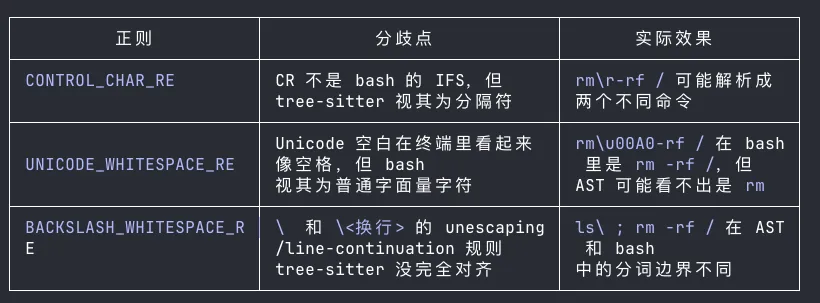
Example: rm\u00A0-rf / — tree-sitter sees rm\u00A0-rf as one token (not rm), so static rules wouldn’t flag it. But bash treats \u00A0 as a separator, executing rm -rf /.
2.2 Dangerous Structure Types Trigger Ask Mode
AST node types are checked against a dangerous types set including command_substitution, process_substitution, subshell, for_statement, function_definition, etc. Matches trigger ask mode or rejection.
2.3 Wrapper Unwrapping Consistency Check
Original: timeout 5 eval "rm -rf /"
Wrappers like time, nohup, timeout, nice, env, stdbuf are stripped layer by layer to expose the actual command. Without this, checking argv[0] === 'timeout' would pass, but bash actually executes eval "rm -rf /".
Design principle: reject unknown cases.
2.4 Command Name Robustness Check
After unwrapping, validate the command name:
- Not empty
- Not a placeholder (
__CMDSUB__,__VAR__) - Not a fragment (starting with
-,|, or&)
2.5 Eval-like Builtin Interception
Builtins that interpret arguments as code: eval, source, ., exec, command, trap, alias, let, etc. These are intercepted with specific safe-mode exceptions (e.g., command -v is allowed).
2.6 Pipe Segment Recursive Checking
Commands with pipe | are segmented, each segment getting full permission verification. Without segmentation, only the first command gets checked — echo hello | rm -rf / would pass on echo hello alone.
2.7 cd + git Combination Detection
Git reads .git/config and executes hooks from the current directory. If cd switches to an untrusted directory, any git command becomes a potential code execution entry point. Both must be detected together.
2.8 Dangerous Deletion Path Interception
For rm and rmdir, extract target paths and match against system-critical files: wildcard deletions, root directories, Windows drive roots, home directories, root direct children, and Windows system directories.
3. Complete 24 Static Verification Rules
| # | Rule | Core Purpose |
|---|---|---|
| 1 | Control chars & Unicode whitespace | Parser/bash tokenization divergence |
| 2 | Dangerous AST types | Statically unprovable structures |
| 3 | Wrapper unwrapping | Expose real inner command |
| 4 | Command name robustness | Empty/placeholder/fragment names |
| 5 | Eval-like builtin interception | Secondary code interpretation |
| 6 | Zsh dangerous builtins | Shell capability bypass |
| 7 | Array subscript execution | Flag-triggered arithmetic eval |
| 8 | read/unset bare NAME | Implicit expression parsing |
| 9 | [[ ]] arithmetic comparison | Implicit execution entry |
| 10 | Shell keyword misparsing | AST misinterpretation defense |
| 11 | Newline + # comment offset | Parameter hiding via comment |
| 12 | jq system() interception | Code execution bridge |
| 13 | /proc/*/environ access | Credential leakage |
| 14 | Complex structure operators | Hidden execution boundaries |
| 15 | Pipe segmentation + cd+git | Cross-segment risk splitting |
| 16 | Process substitution (legacy) | Fallback interception |
| 17 | Redirect target safety | Arbitrary file writes |
| 18 | Dangerous deletion paths | System directory protection |
| 19 | cd + write path uncertainty | CWD change write risk |
| 20 | -- terminator handling | Flag parsing robustness |
| 21 | Path wrapper re-verification | Bypass prevention |
| 22 | Legacy injection safety net | Regex fallback |
| 23 | Safe heredoc exception | False positive reduction |
| 24 | Subcommand fanout limit | CPU starvation/DoS prevention |
4. Permission Verification
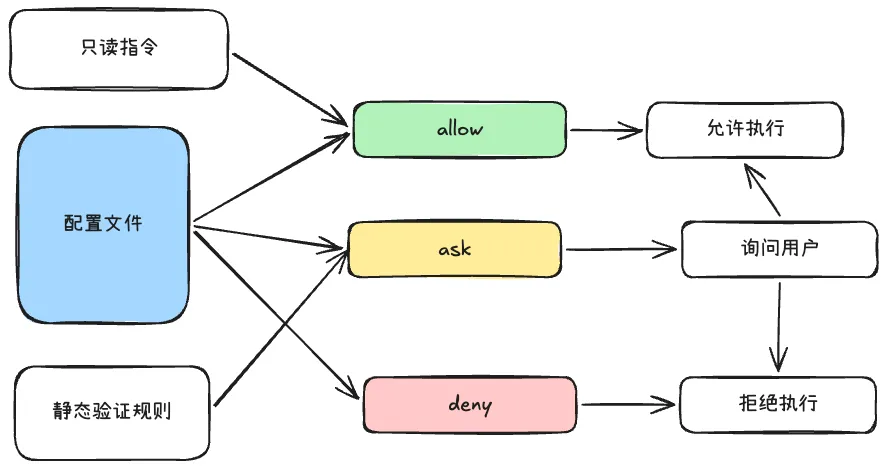
Three permission states: allow (execute), deny (reject), ask (user confirmation).
Matching rules:
- Configuration file rules → corresponding permission state
- Static rule hits → mostly “ask” state
- Read-only commands → direct “allow”
Configuration format:
{
  "permissions": {
    "allow": ["Bash(git status:*)", "Bash(npm install:*)"],
    "deny": ["Bash(rm:*)", "Bash(rm -rf:*)"],
    "ask": ["Bash(docker:*)"]
  }
}
Read-only command criteria: ls, cat, head, tail, wc, find, grep, git status/diff/log, etc. — no cd, no output redirection or pipe write operators.