Anthropic Hackathon Champion: Claude Code Configuration Guide
Preface
Analysis references:
- Hackathon champion Claude Code config collection: https://github.com/affaan-m/everything-claude-code
- Anthropic official Skill configuration: https://github.com/anthropics/skills
- ClaudeCode configuration docs: https://code.claude.com/docs/en/sub-agents
1. Cross-Session Shared Memory
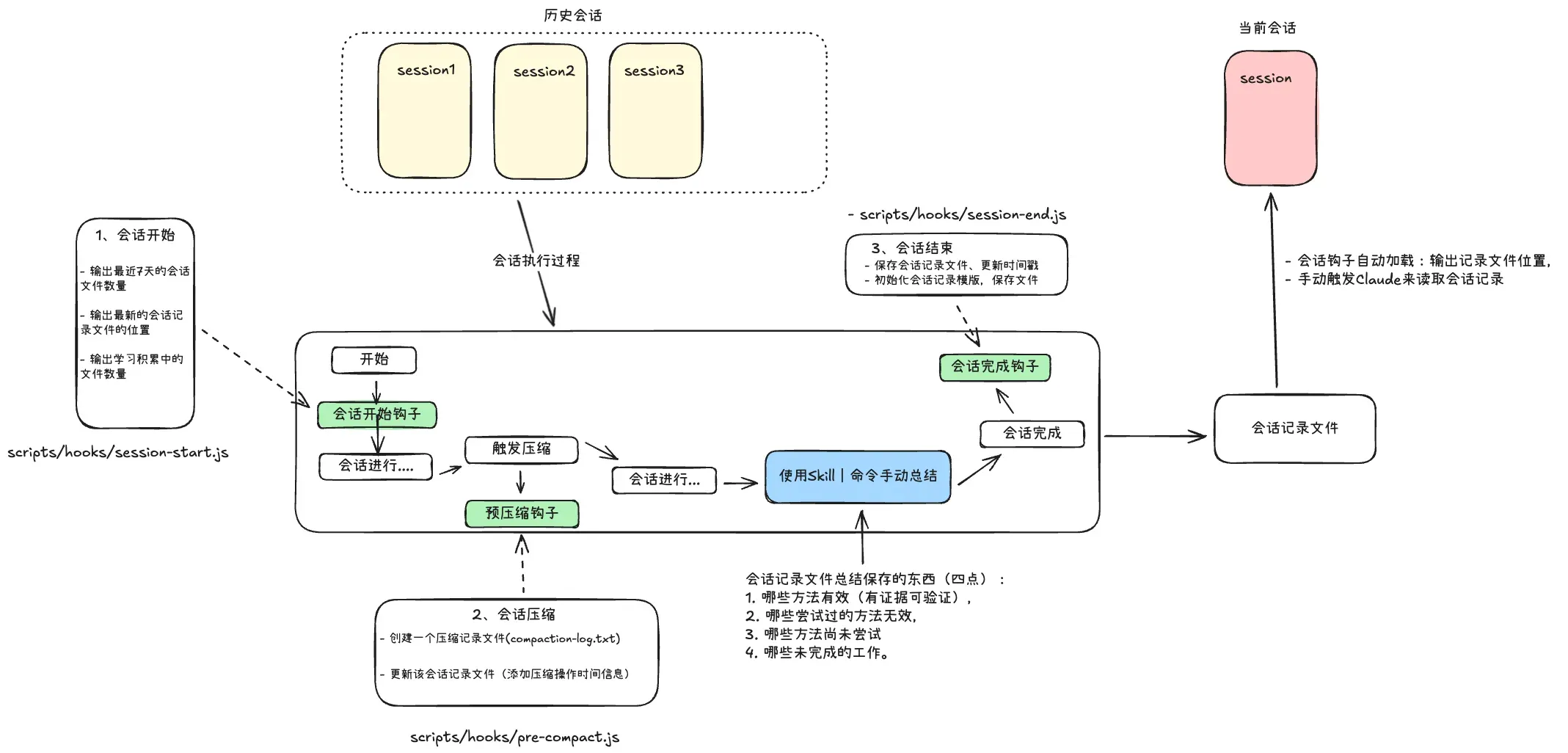
When using ClaudeCode, session records can be saved locally and resumed with the resume command. However, complete session records get compressed, and after multiple compressions, critical decision information gets diluted until completely forgotten. The four critical types of information are:
- Which approaches worked (with verifiable evidence)
- Which attempted approaches failed
- Which approaches haven’t been tried yet
- Which work remains unfinished
To ensure these four types of information can be shared across sessions, we need a separate intermediate temporary session file.
This requires a complete automated file creation/saving workflow plus content-filling instructions, using three hooks:
- PreCompact Hook: Before context compression, save important state to file
- SessionComplete Hook: At session end, persist learning outcomes or initialize file
- SessionStart Hook: At new session startup, auto-load prior context and output latest file path
What content to fill and how?
- Content: Let Claude summarize session history based on the four information types above, or manually write key session information
- Method: Mention it in chat, or create corresponding Skills and Commands
Files used in this pattern:
- scripts/hooks/session-start.js
- scripts/hooks/pre-compact.js
- scripts/hooks/session-end.js
2. Continuous Learning and Memory Updates
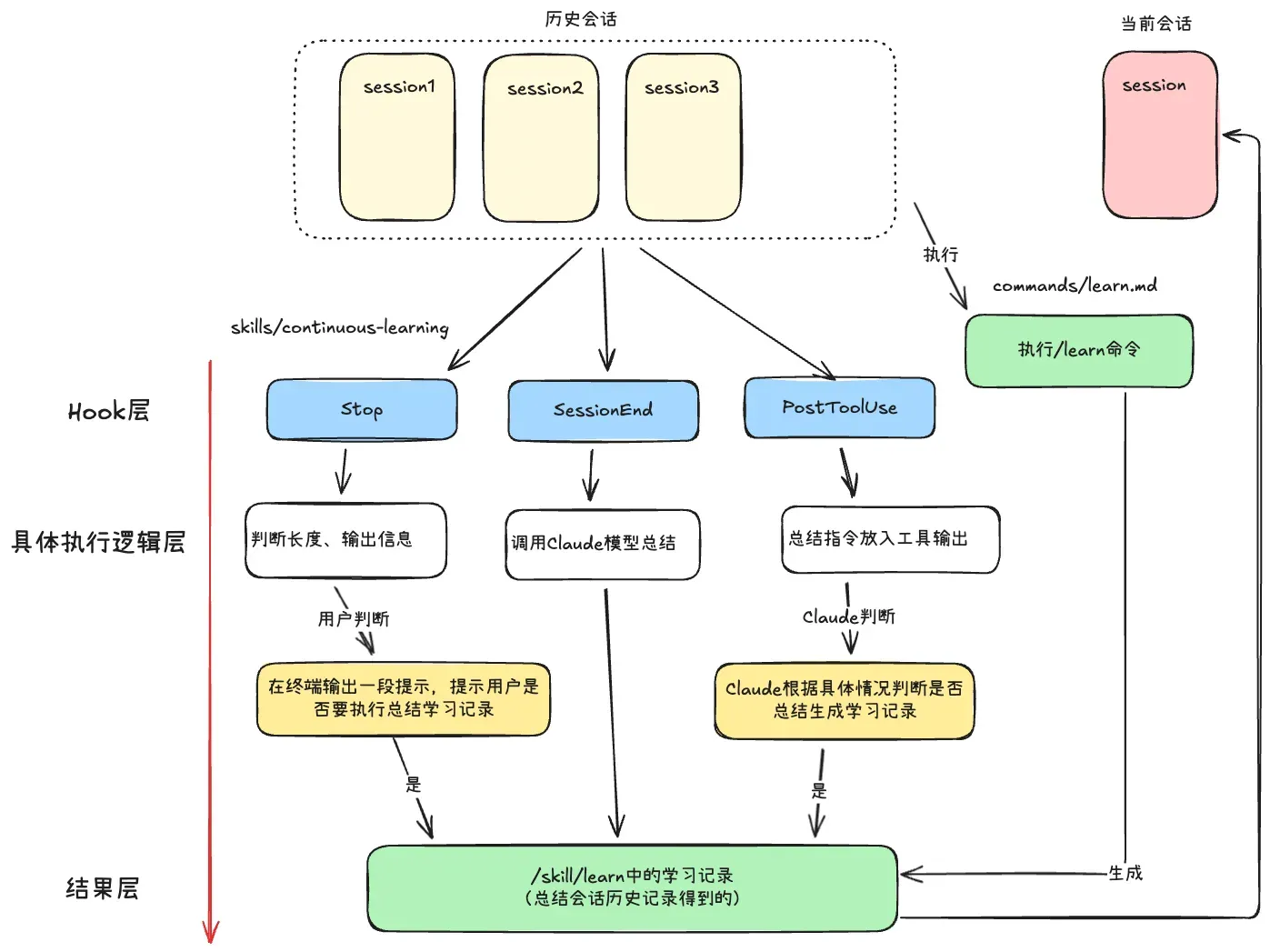
Two trigger methods for continuous learning: Hook-mounted automatic scripts and Command manual execution.
Hook-based automatic approach uses three different-timed Hooks:
- Stop Hook: Check session list length; if threshold met, output prompt info
- Sessionend Hook: Read complete session history; call claude via
claude -p "xxx"to generate learning records - PostToolUse Hook: Check session list length; inject “summarize learning record” instruction into tool return results
Command-based manual approach: the /learn command
When users complete tasks and find design patterns worth saving to memory, trigger /learn.
All summarized learning records are stored in /skill/learn folder, so the Agent can automatically use Skill learning records based on context.
Files used: commands/learn.md, skills/continuous-learning
The difference between Session Files and Learning Files:
- Learning Files (Learn Skill): Global, permanent, abstract knowledge rules — purpose: avoid repeating mistakes, accumulate experience
- Session Files (Session Tmp): Local, temporary, specific work state — purpose: cross-session continuity
3. Improving Project Maintainability — Evaluation + Dead Code Cleanup
3.1 Checkpoint-Based Evaluation
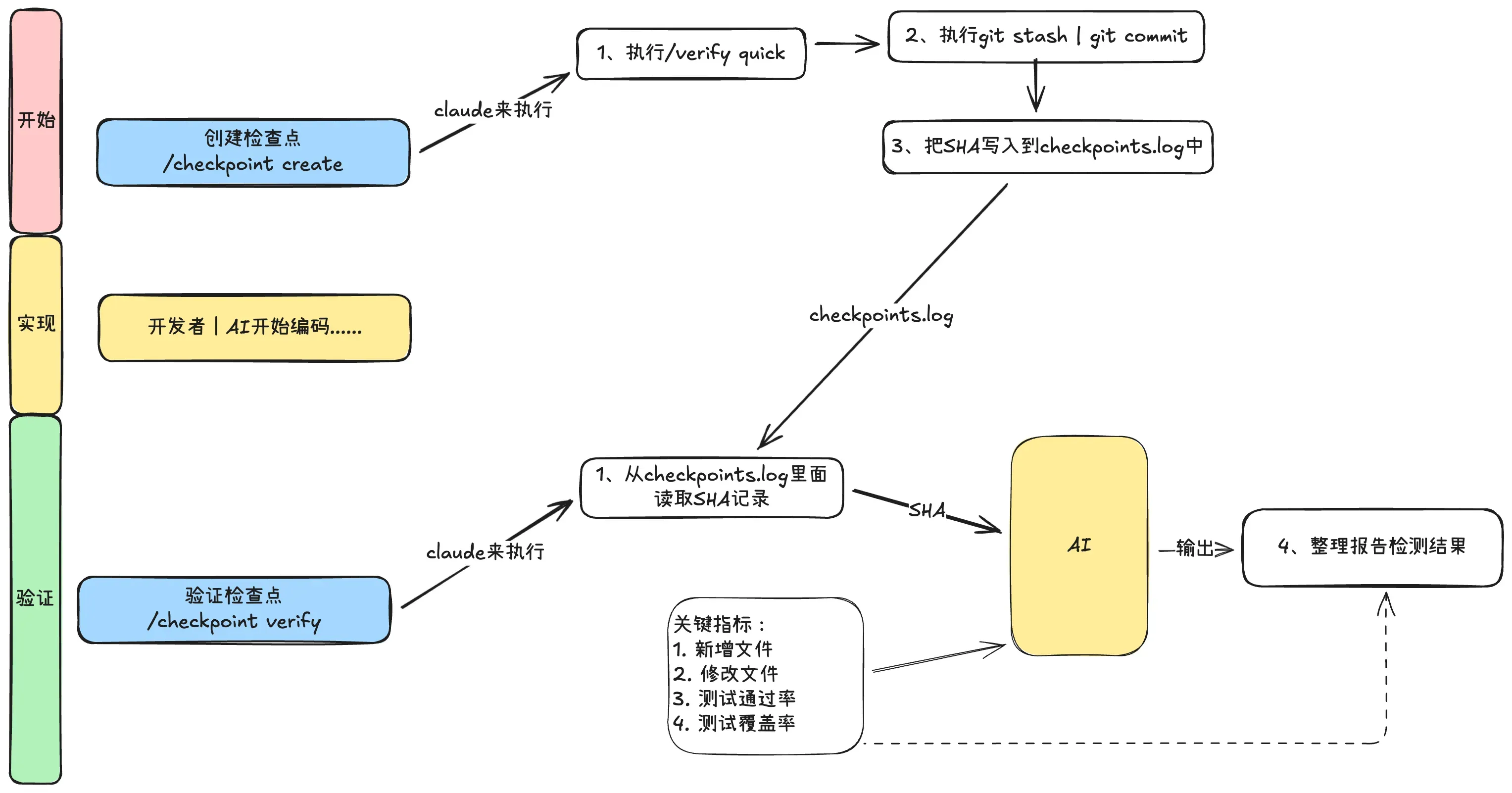
The flow is a three-step cycle: Start -> Implement -> Verify, constraining each feature.
- Start: Before implementing, run the start command to ensure a clean workspace
- Implement: Write feature code — manually or with AI
- Verify: Run verification to evaluate code quality against requirements
The start command (/checkpoints create):
- Execute
/verify quick— only check build and type errors - Execute
git stashorcommitto save current state - Write SHA to
checkpoints.logviagit rev-parse --short HEAD
The verify command (/checkpoint verify):
- Get the latest SHA from checkpoints.log
- Model calls
git diffand runs relevant tests - Output a report with key metrics: new files, modified files, test pass rate, coverage, etc.
This approach is elegant because the flow isn’t forced automation — it only provides the minimum necessary condition: the SHA. How to get new/modified files, tests, and coverage metrics is determined by the model, maximizing model autonomy.
3.2 Continuous Evaluation
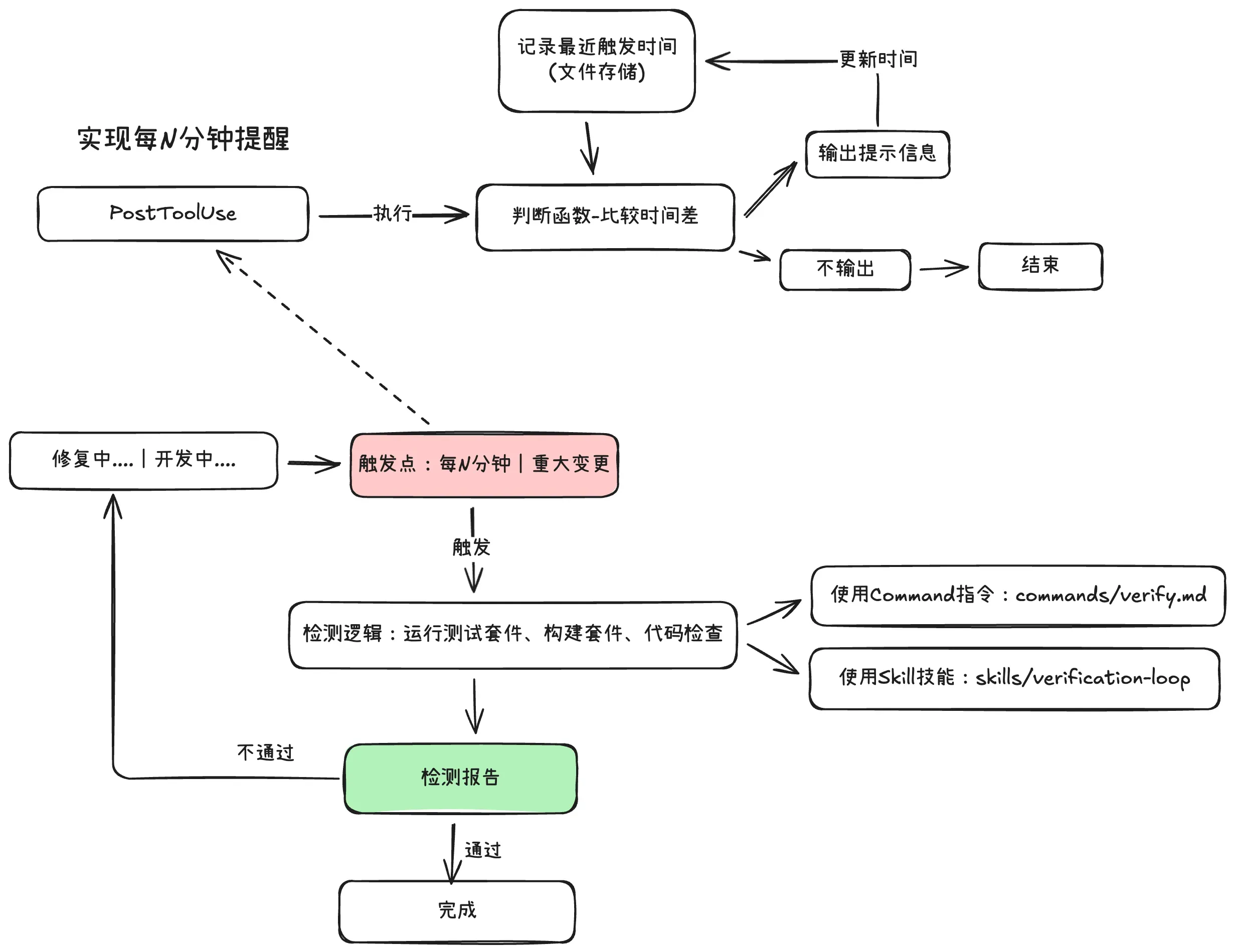
Flow:
- Trigger: Run every N minutes or after major changes
- Execute: Run full test suite, build status, code checks
- Results: Output detailed inspection report
- Decision: Determine if code passes; if not, proceed to fix
- Fix: Repair failing checks, then conclude
Difference between the two evaluation approaches:
- Checkpoint-based: Suited for linear workflows with clear milestones
- Continuous: Suited for long-running sessions
The deciding factor is task nature — checkpoint evaluation for feature implementation with clear stages, continuous evaluation for exploratory refactoring or maintenance without clear endpoints.
3.3 Dead Code Cleanup
Uses a sub-Agent and a Command:
# Refactor Clean

Safely identify and remove dead code with test verification:

1. Run dead code analysis tools: knip, depcheck, ts-prune
2. Generate full report in .reports/dead-code-analysis.md
3. Categorize by severity: SAFE / CAUTION / DANGER
4. Only suggest safe deletions
5. Before each deletion: run tests -> confirm pass -> apply -> test again -> rollback if failed
6. Show cleanup summary

Never delete code before running tests!
3.4 Code Maps — Trusted Context
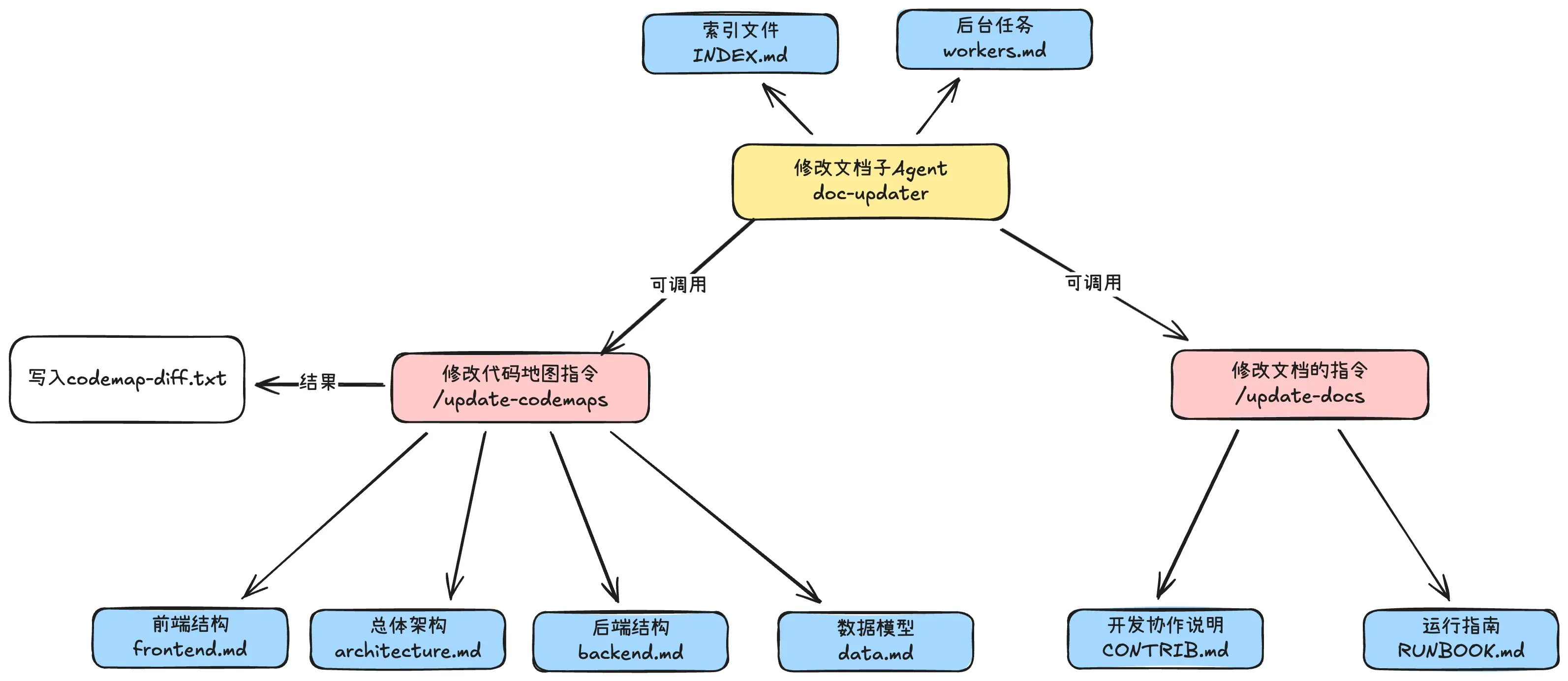
Code maps serve as an entry point for AI or developers to understand the codebase. AI can understand the project’s global picture with fewer tokens through code maps. Keep documentation minimal and concise.
3.5 Summary
Four approaches to improving project maintainability:
- Two verification methods (checkpoint and continuous) are sufficient to avoid most technical debt with appropriate intervention.
- Continuously updating code maps helps, as it records changelogs and how the code map evolves over time — providing a reliable information source beyond the repository itself.
- Through strict rules, Claude avoids creating messy .md files, duplicate files for similar code, and doesn’t leave large amounts of dead code.
4. Sub-Agent Usage: Loop Verification + Orchestration
Sub-agents exist to save context by returning summaries rather than full information. However, the orchestrator has semantic context that sub-agents lack.
From @PerceptualPeak: “Your boss sends you to a meeting and asks for a summary. Nine times out of ten, he’ll have follow-up questions. Your summary won’t contain all the information he needs because you lack his implicit context.”
Two better approaches: loop verification calling pattern and sequential orchestrator.
4.1 Loop Verification Calling
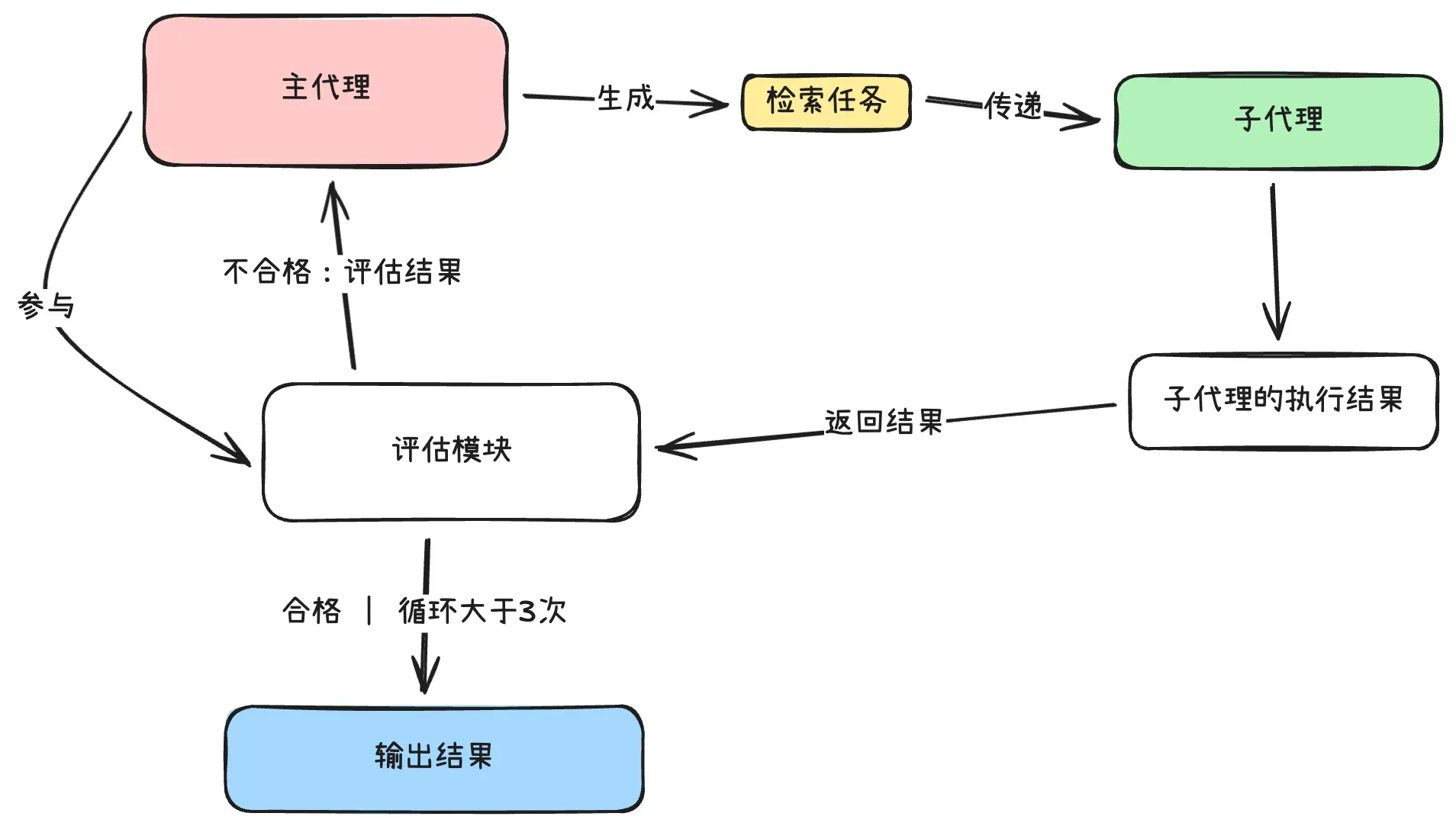
Flow:
- Main agent evaluates sub-agent results
- If results are inadequate, main agent proposes new retrieval tasks
- Sub-agent continues retrieval with new tasks
- Maximum 3 rounds
In this pattern, tasks assigned to sub-agents should be “specific question + broader goal” to maximize retrieval coverage.
4.2 Orchestrator Agent
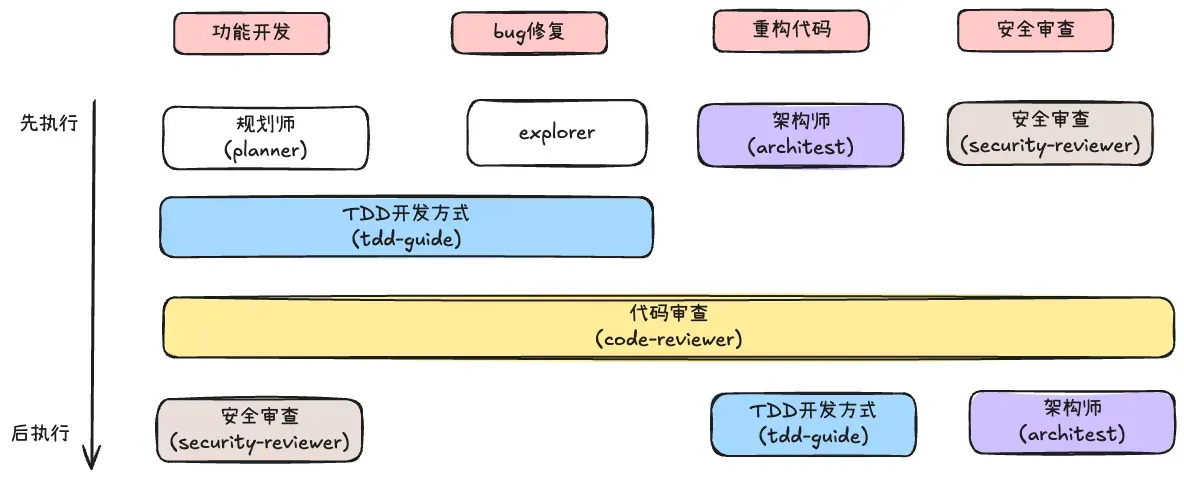
Principles:
- Each agent receives clear input and produces clear output
- Output becomes input for the next stage
- Never skip stages — each contains value
- Use /clear between agents to keep context fresh
- Store intermediate outputs in files (not just memory)
Custom orchestration is also supported:
/orchestrate custom "architect,tdd-guide,code-reviewer" "Redesign caching layer"5. Configuration File Reference
By core functionality:
- Cross-session shared memory: session-start.js, pre-compact.js, session-end.js hooks
- Continuous learning: commands/learn.md, skills/continuous-learning
- Project maintainability: commands/checkpoint.md, commands/verify.md, skills/verification-loop, commands/refactor-clean.md, agents/refactor-cleaner.md, agents/doc-updater.md, commands/update-codemaps.md, commands/update-docs.md
- Sub-agent usage: skills/iterative-retrieval, commands/orchestrate.md, agents/architect.md, agents/code-reviewer.md, agents/planner.md, agents/security-reviewer.md, agents/tdd-guide.md