Multi-Agent Collaboration: Agent Team and Agent Room
I’ve been practicing multi-agent design patterns recently and considering adding multi-agent capabilities to ActSpace. Well-designed multi-agent systems can improve results while reducing costs — cost control brings excellent user experience for application teams, which I consider part of Harness Engineering.
Through continuous exploration, I’ve found multi-agent design, especially collaboration aspects, to be fascinating and challenging. This appears to be a major breakthrough direction for mature Agents — as we can see from ClaudeCode’s Agent Team and Dynamic Workflows.
Below are some of my explorations and thoughts on multi-agent collaboration.
Research references:
- “Is Having Agents in the Room Meant to Be Chaotic?”: https://raft.build/resources/blog/is-having-agents-in-the-room-meant-to-be-chaotic/
- “multica open source project”: https://github.com/multica-ai/multica
- “Model and effort in Claude Code”: https://x.com/ClaudeDevs/status/2074900291062034618
1. Agent Team Design
Agent Team is a multi-agent collaboration pattern similar to a “temporary team” tackling a complex task together. It includes a Lead role and Teammates, with communication happening not just between Lead and members, but also between members.
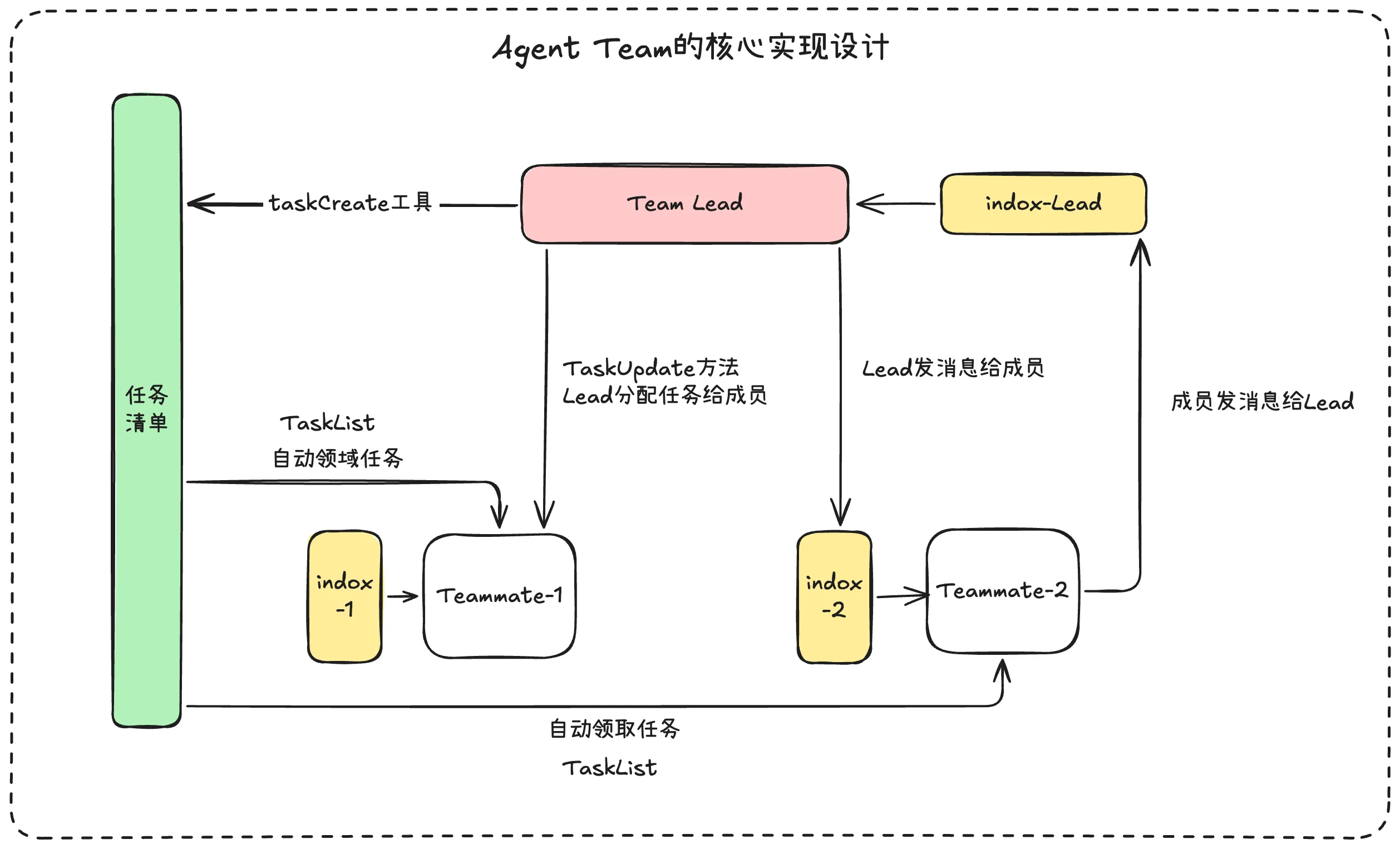
Four core components of an Agent Team: Team Lead, Task List, Team Members, and Message Inbox
Core execution steps:
- Team Lead generates a task list based on task complexity and creates basic team information
- Lead can directly assign tasks to members; idle members can also proactively claim tasks
- Communication between Lead and Teammates goes through an inbox (message inbox), similar to sending emails in human collaboration
Team Lead creates tasks and team info using two tools: taskCreate and TeamCreate, which create two key folders:
~/.claude/teams/jink-team/
~/.claude/tasks/jink-team/
How are tasks distributed?
Agent Team uses Lead assignment and member self-claiming. Lead uses TaskUpdate; members use TaskList to check status, then claim based on status. This is implemented by a loop scheduler executing every 500ms.
The most critical part — team collaboration: communication signals in Agent Team are of two types: information and instructions, passed through the message inbox.
- Information: content, task descriptions and inputs — same as normal user input
- Instructions: hard signals like permission approval notifications, process shutdown, etc.
The inbox is a simple JSON file with read/unread status. Each Agent’s execution loop repeatedly reads this file; new messages are injected into context for the next round.
Agent Team’s message passing uses simple files + scheduler — very effective. The most critical implementation detail is file lock design.
For example, two Agents might simultaneously read the same task, creating unstable state. File locks ensure only one Agent reads and modifies at a time.
ClaudeCode’s team implemented this elegantly using mkdir — which is atomic on the filesystem: only one process can successfully create the same directory.
tasks/jink-team/
  3.json          ← actual task content
  3.json.lock/    ← "someone is modifying 3.json" (physical form of the lock)
2. Agent Room Design
Agent Room is another multi-agent collaboration pattern — no “Lead”, just equal exchange: mutual discussion, sharing opinions, intellectual collision in a shared room.
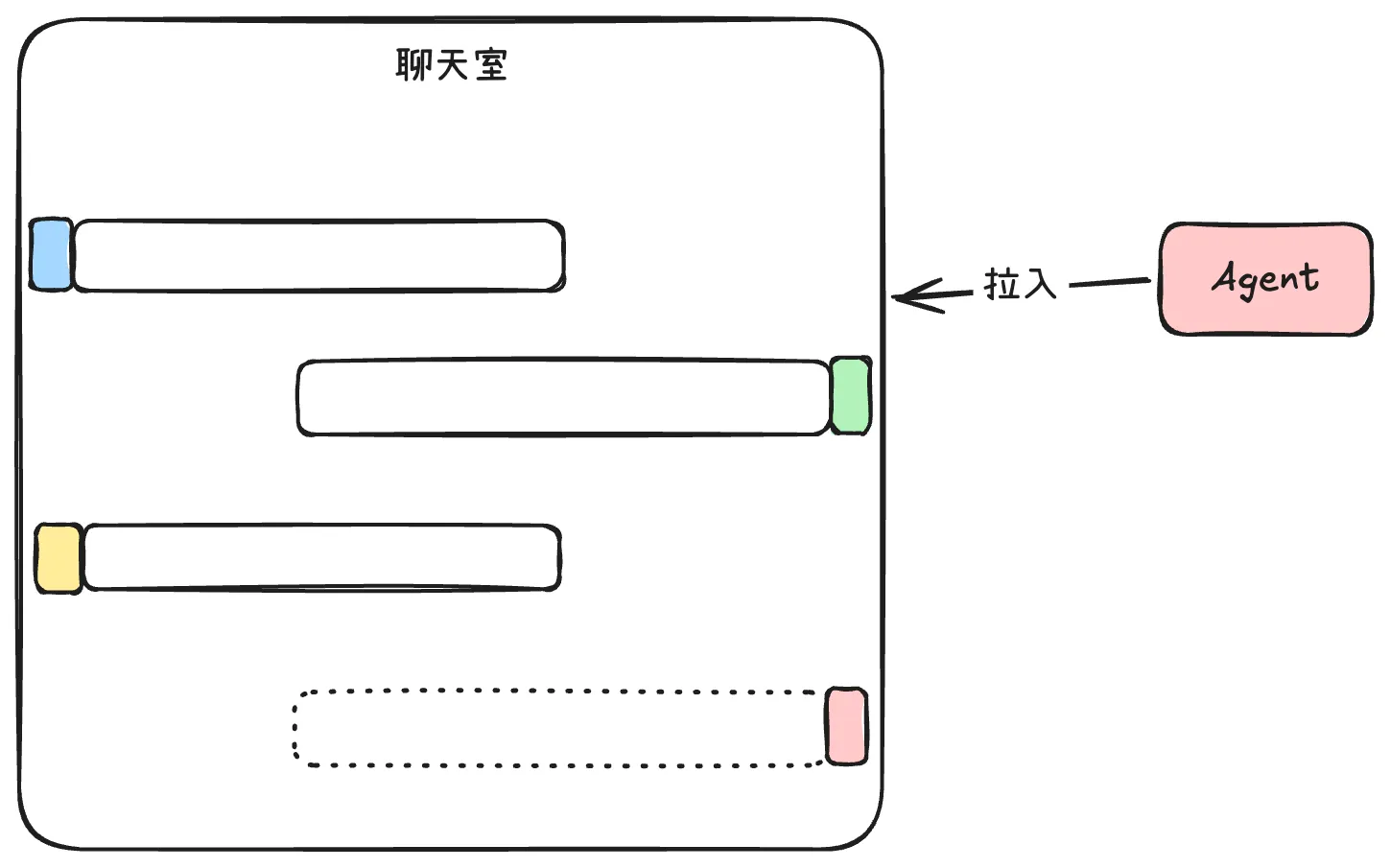
The core of Agent Room lies in active vs passive context. If you start from a chat room and pull Agents in, every message floods into each Agent’s context passively — terrible from a context management perspective.
Every message injected into context gets the model’s attention. Too much irrelevant or conflicting information interferes with Agent decision-making.
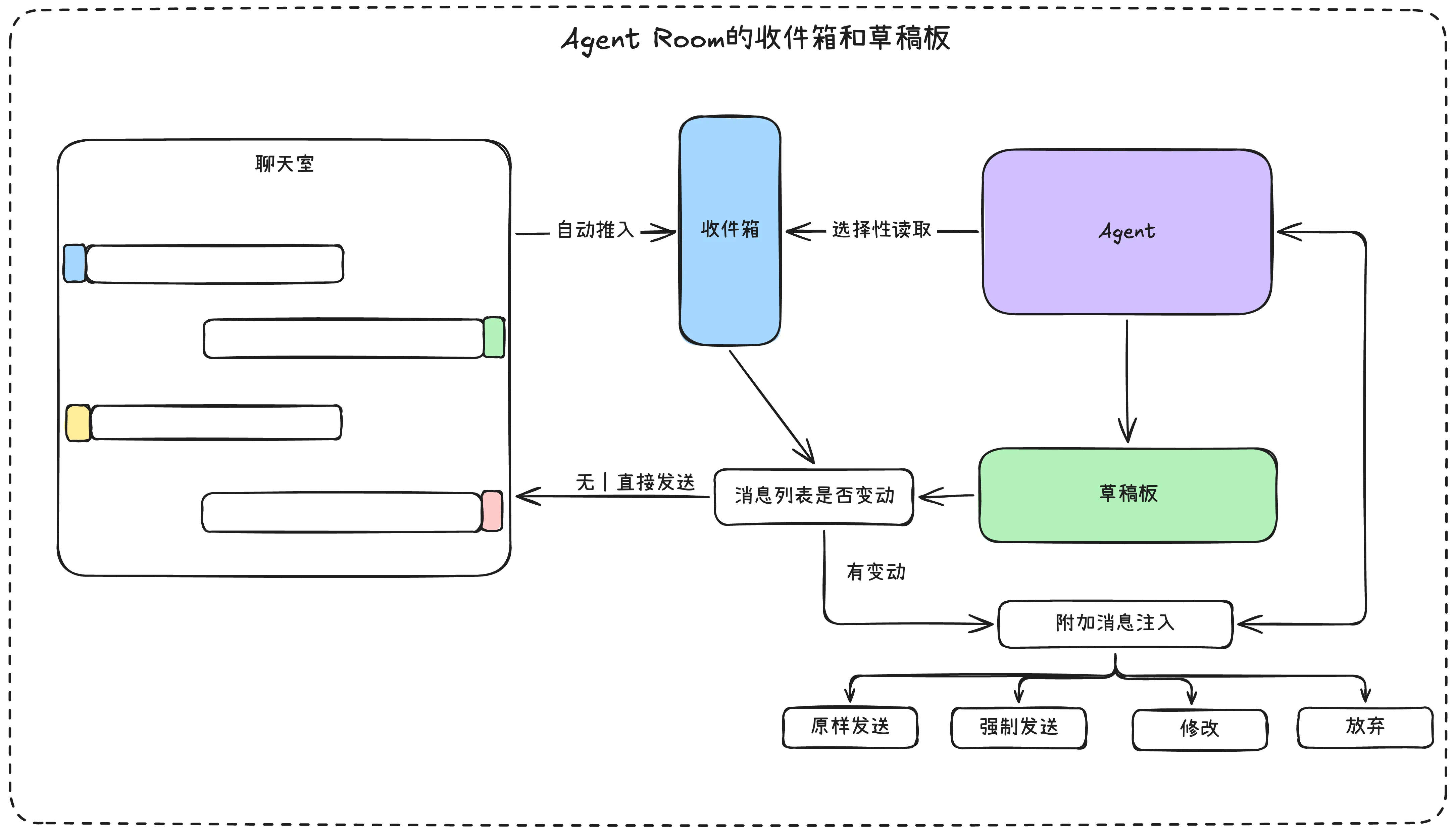
A better approach uses two concepts: Inbox and Draft Board
- Inbox: Chat room messages go into the Agent’s inbox, but what gets pushed into Agent context is entirely the Agent’s decision — it selectively pulls messages
- Draft Board: Before each output to the chat room, the Agent checks if the inbox has been updated. If not, output directly. If updated, the message is held and re-injected with additional info for re-evaluation. The Agent then has four choices: modify, send as-is, discard, or force send.
I have another approach to consider — no inbox or draft board, but chat messages are pushed directly into Agent context, with an added concept: Thought Sprites (sub-Agents).
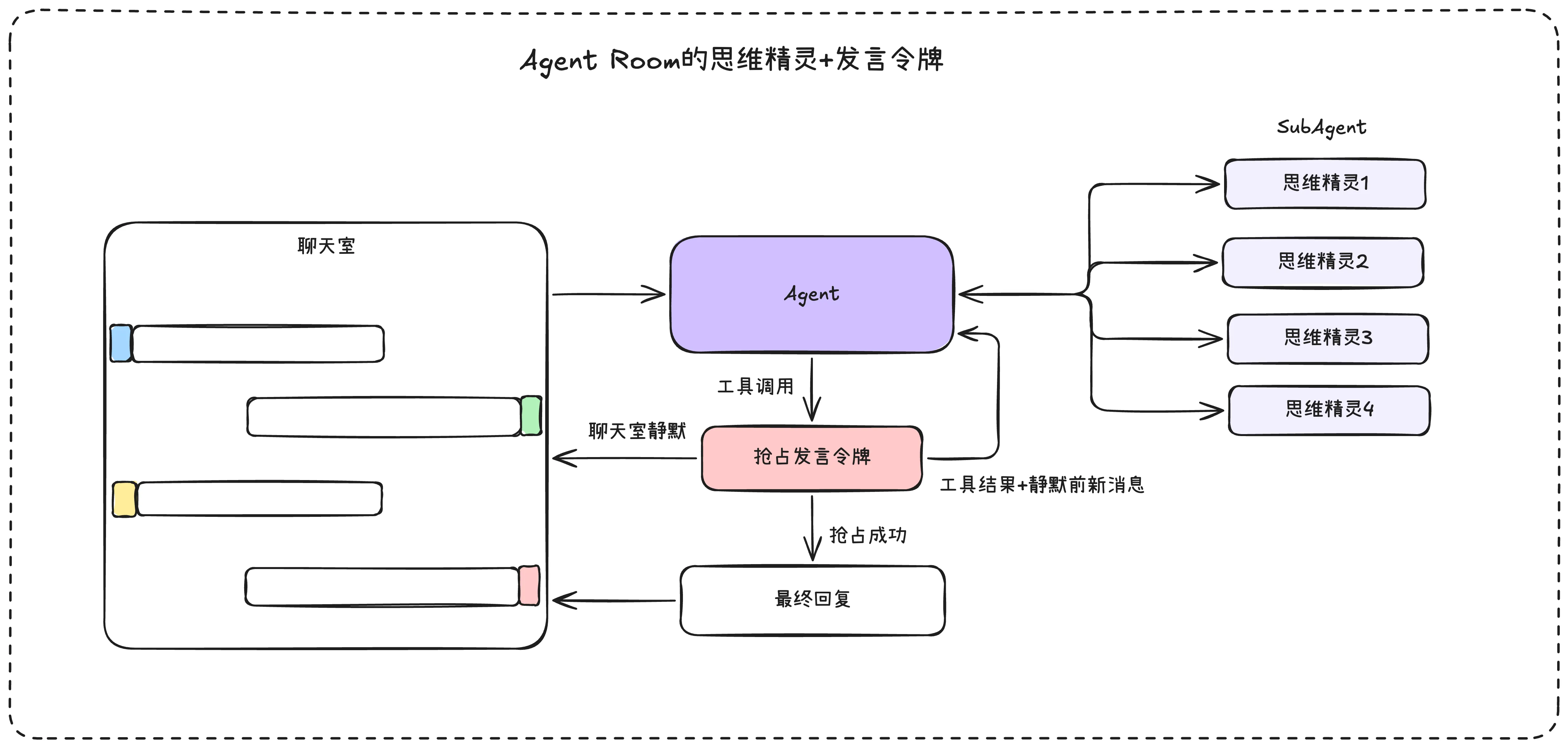
The idea: the Agent doesn’t execute tasks but distributes them to Thought Sprites, then waits for sub-agent results for comprehensive analysis. Before replying, it calls a tool to “seize the speaking token” — like raising your hand to speak in class. Upon success, the Agent gets exclusive chat room access for its response.
This is just a hypothesis — I haven’t practiced it yet. Interested readers are welcome to try!
3. Agent Task Design
A Task is the smallest execution unit for an Agent. One Task can only be executed by one Agent, but one Agent can execute multiple Tasks simultaneously.
Task generation patterns from the two designs above:
- Agent Team tasks: Complex tasks split into smaller ones — temporary tasks
- Agent Room tasks: User-specified tasks for specific members — complete tasks
- Timed tasks: Tasks with time attributes that execute on schedule
Multi-agent projects can have a Task module displaying current tasks by status or by Agent.
4. Agent Member Design
In multi-agent coordination, the Member role is crucial. Members need complete definitions: identity, avatar, name, settings, tools, scope, memory, etc.
Such Members work directly in Agent Room as room members — one Member can join multiple rooms with isolated sessions.
In Agent Team, if Members are always the same fixed group, it defeats the purpose of temporary teams. A design consideration: Members can have “avatars” — team members in Agent Team are essentially Member avatars with some core attributes unchanged but others variable. Same Member, different “avatars” across Teams.
In Agent Team, Member positioning design isn’t the most important thing — what matters is assembling the right team for each complex task.
This unifies Member design across Team and Room for consistent maintenance.