Integrating a Skill System into Your Agent
When adding Skill support to your own Agent, the core development steps are: Discovery, Parsing, Usage, Management.
- Discovery: Where are your Skills stored — local or cloud? What’s the priority between project-level and user-level? How do you determine that a folder is a Skill?
- Parsing: Extract the metadata from SKILL.md
- Usage: How does the Agent use the parsed metadata — system prompt or tool description? The subsequent progressive disclosure strategy — use a read tool or an internal activation tool?
- Management: How to maintain the validity of Skills loaded into context? Should Skill content be protected during context compression?
The core development principle is also the core feature of Skills: Progressive Disclosure
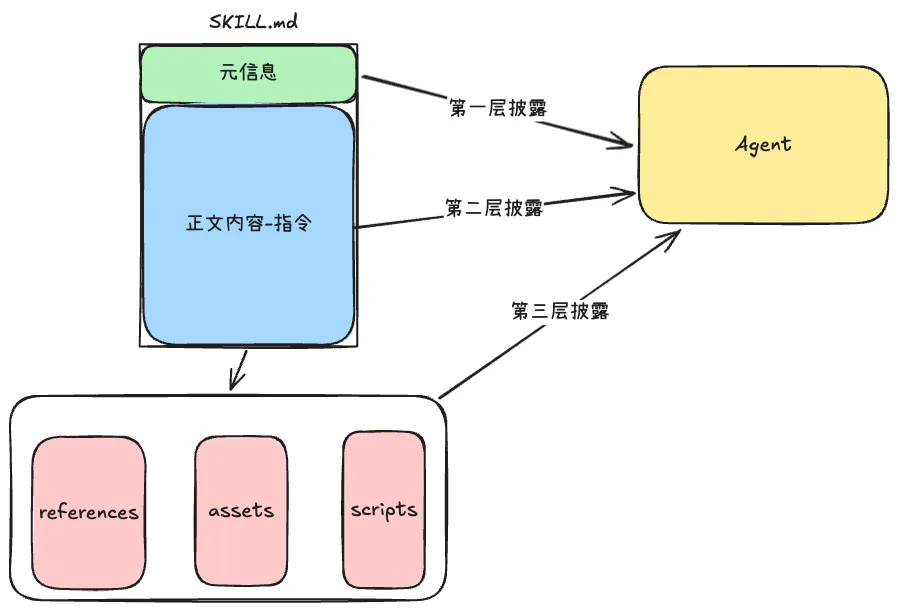
- First-level disclosure: At session startup, load metadata (name + description) into context
- Second-level disclosure: When a Skill is activated — i.e., the Agent matches user input to a Skill’s metadata — load the complete SKILL.md content into context
- Third-level disclosure: After the full SKILL.md content is loaded, if the task complexity is high, the Agent loads more detailed guidance — scripts, references, and static assets — on demand
1. Discovery
The Agent needs to discover which Skills are available in the runtime environment from corresponding file directories. Most Agents run locally, so we’ll focus on local Skill discovery.
Skill directory scope is divided into two types: user global scope and project local scope
- Project local scope: Skills that only apply to the current project, e.g., frontend design Skill, React best practices Skill
- User global scope: Skills that apply to all user projects, e.g., find-skills, pptx (PPT generation Skill)
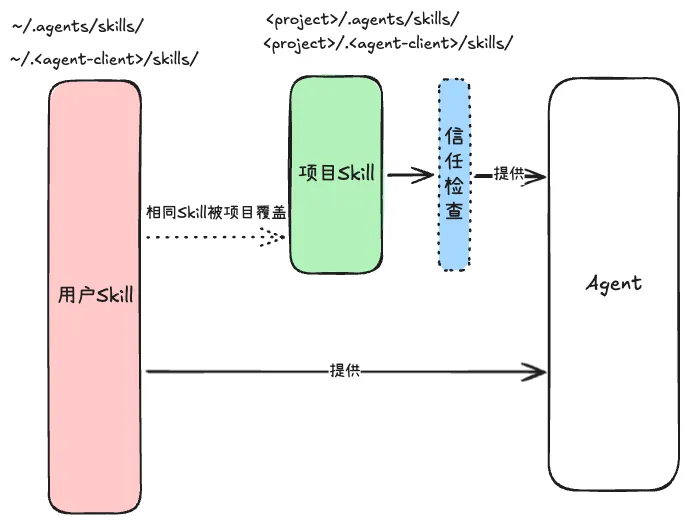
The specific Skill directory paths are:
<project>/.<agent-client>/skills/: Project-scoped Skills<project>/.agents/skills/~/.<agent-client>/skills/: Global-scoped Skills~/.agents/skills/
You’ll notice the /.agents/ path exists because it has become a widely adopted convention for sharing skills across different clients. For example:
Someone might develop a-agent-client with Skills in
~/.a-agent-client/skills/. When you develop b-agent-client and want to use a’s Skills, you’d need compatibility — reading specific directories like~/.a-agent-client. One is fine, but what about many with different paths? So everyone adopted a convention: regardless of the client, all installed Skills can be provided under~/.agents/skills/, enabling cross-client compatibility.
Reading from /.agents/ means Skills installed by other compliant clients are automatically visible to yours, and vice versa.
When the same Skill appears in both user global and project local scope, the priority is:
- Project-level takes priority over user-level
- Within the same scope, priority follows discovery order
Trust checking is designed because some pulled projects may contain potentially malicious or insecure Skills that could leak secrets.
So in the Agent’s configuration file, you can design a Skill trust check layer. Within project scope, only trusted Skills can be loaded — this is determined at the business logic level.
Development tips:
- Skip directories that don’t contain Skills, e.g., node_modules/
- Consider respecting the project’s .gitignore file, avoiding scanning build artifacts like dist/
- Don’t recursively search endlessly — set a maximum depth (5-6 levels) and maximum file count
2. Parsing
At the Agent session start phase, Skill metadata needs to be loaded into context. So after getting the Skill file paths, the next step is parsing SKILL.md metadata.
A SKILL.md file contains two parts:
- YAML front matter separated by
---delimiters - MD-formatted content after the closing delimiter
The metadata fields and constraints are:
- name (required): Skill name, max 64 characters, lowercase letters, numbers, and hyphens only
- description (required): Skill description, max 1024 characters
- license (optional): License name or file reference
- compatibility (optional): Environment requirements
- metadata (optional): Additional metadata
- allowed-tools (optional): List of tools the Skill is allowed to execute
Detailed development steps:
- Find the start and end delimiters in the SKILL.md file
- Parse the YAML block, extracting name, description, and other optional fields
- The MD content after the closing delimiter is the SKILL.md body
When parsing YAML, don’t be too strict with error handling — minor errors shouldn’t prevent Skill parsing. Return error info as warnings to the user.
The parsed metadata needs to be loaded into the Agent’s context. We can use a Map format, storing metadata in memory with name as key. The value needs at least three fields:
- name
- description
- location: absolute path to the SKILL.md file
3. Usage
3.1 Placing Metadata in System Prompt
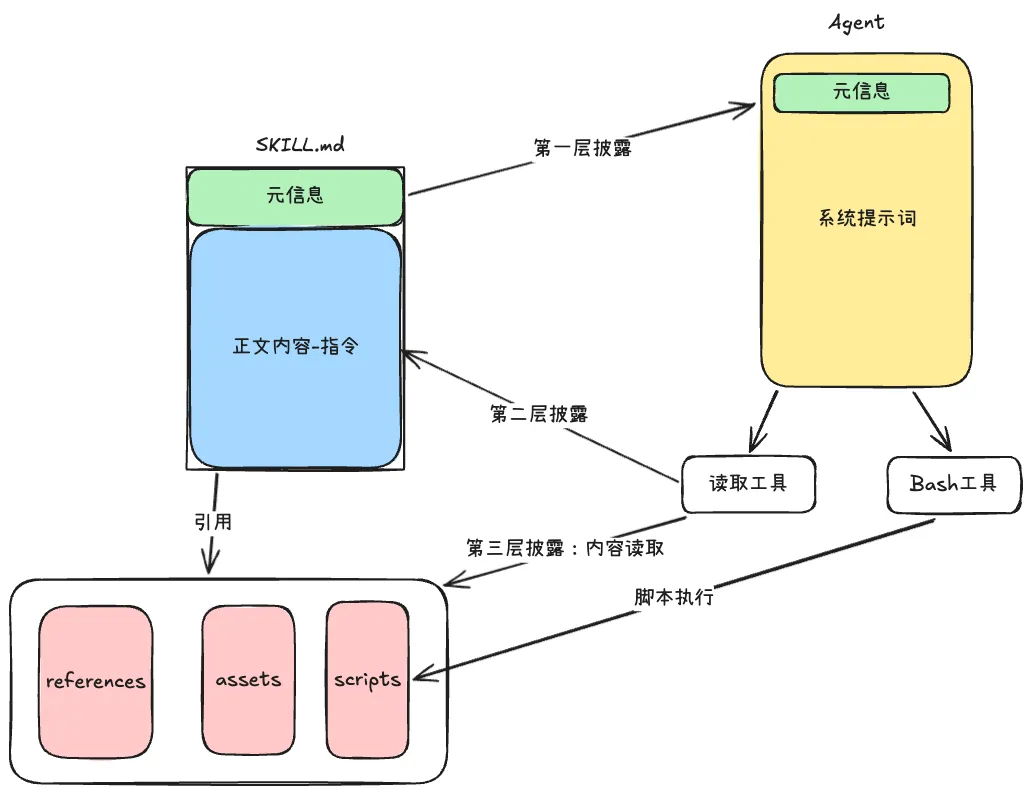
- At session start, place metadata in the system prompt with a brief Skill usage instruction telling the model how and when to use it — first-level disclosure
- When user input triggers a matching Skill, the Agent calls a read tool to load the complete SKILL.md — second-level disclosure
- After the full SKILL.md is loaded, if the Agent needs more detailed guidance, it reads references, assets, and scripts from paths in the SKILL.md — third-level disclosure
- If scripts need execution, the Agent calls the Bash tool
Use structured formats (XML, JSON, etc.) when placing metadata in the system prompt — this is very effective for context management.
<available_skills>
  <skill>
    <name>code-review</name>
    <description>Review code for bugs, style issues, and best practices. Use when the user wants feedback on their code.</description>
    <location>/home/user/.agents/skills/code-review/SKILL.md</location>
  </skill>
</available_skills>
The location field serves two purposes:
- Provide the correct path parameter for the read tool
- Give the model a base path reference for correctly reading referenced resources
3.2 Placing Metadata in a Dedicated Tool
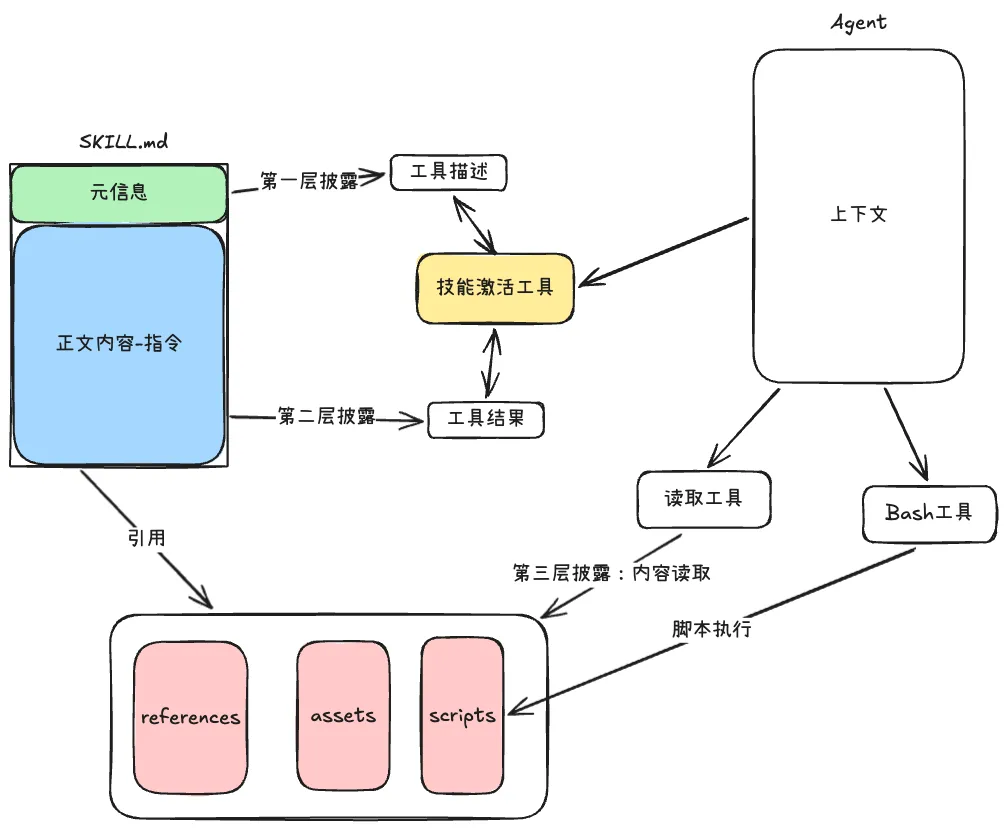
- At session start, Skill metadata is provided in tool description format — first-level disclosure
- When the Agent needs complete SKILL.md content, it passes the name as a parameter and the tool returns the content — second-level disclosure
- In third-level disclosure, the Agent uses read tools to get full reference resource content
- The Bash tool can execute Skill scripts
Using dedicated tools vs system prompts — dedicated tools have advantages in development control:
- Control returned content — only return body content, not duplicate metadata
- During context management, tool results can be specially marked to skip compression
- Reference resources are presented in structured list format, more model-friendly
- Enable unique control flows
- Enable statistics and analytics
<skill_content name="code-review">
# Code Review

## When to Use
Use this skill when users need code review, including bug detection,
code style checking, and best practice suggestions.

## Review Steps
1. Read the code and understand its intent
2. Check style issues against references/style-guide.md
3. Run scripts/lint-check.sh for static analysis
4. Output a structured review report

Skill directory: /home/user/.agents/skills/code-review

<skill_resources>
  <file>scripts/lint-check.sh</file>
  <file>references/style-guide.md</file>
  <file>references/common-bugs.md</file>
</skill_resources>
</skill_content>
For skill_resources, instead of relying on SKILL.md to describe references, as a tool result we can read all reference, scripts, and asset folders under the skill, then include file paths in the skill_resources tag. Limit the file list size and signal to the model that “the current list may be incomplete” so the model isn’t constrained during autonomous execution.
4. Management
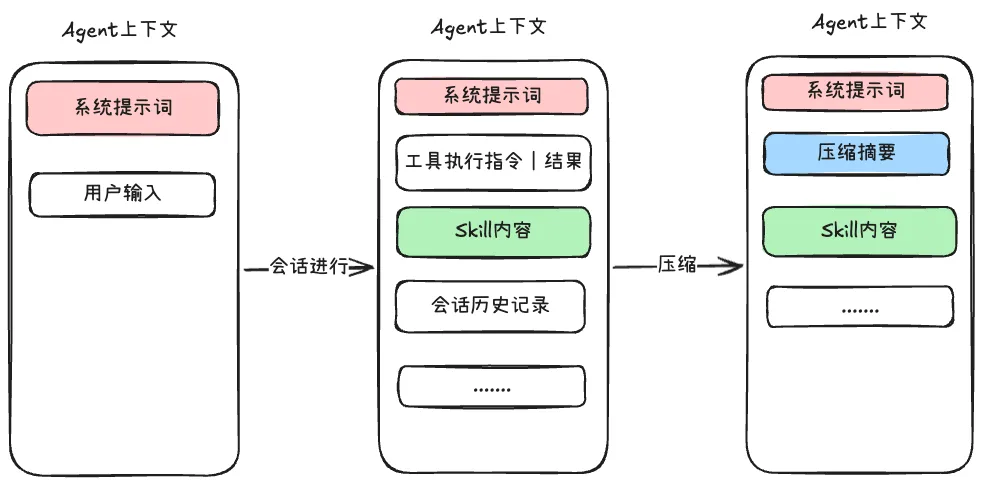
The purpose of progressive loading is to avoid preloading all Skills, since some might not be used initially — loading them would waste context.
However, already-loaded Skill content is worth keeping throughout the session, since the Skill has become behavioral guidance for the Agent. Blindly compressing it would degrade performance. Two approaches to retain Skill content:
- System prompt approach: Identify structured tags in read tool results to preserve Skill content
- Dedicated tool approach: Mark skill activation tool output as protected, checking the mark during compression
This depends on the situation — if conversations are long with many Skills and a small context window, compression is the better choice.
After compression, explicitly prompt the model: “Skills were also compressed — reload them if needed.” Otherwise the model may fall into compression hallucination, believing it still has the Skill loaded.
A more advanced approach: running Skills with a subAgent
The subAgent’s entire execution (Skill instructions + reference files + intermediate reasoning) happens in its own context window, leaving the main Agent’s context completely unpolluted.
Whether to use a subAgent for Skill execution should be the main Agent’s decision, e.g., automatically delegating when task complexity exceeds a threshold.
5. Quick Build
The above describes building Skill support from scratch. The current ecosystem is mature — many Agent SDKs support Skills out of the box.
Using Claude Agent SDK as an example:
- Agent runtime file:
"""Simplified version showing core flow steps"""
async def _run_repl_async() -> None:
    config = load_runtime_config()
    apply_runtime_env(config)
    client = build_client(config)

    try:
        user_input = input("\n> ").strip()
    except (EOFError, KeyboardInterrupt):
        return print("\nGoodbye!")

    try:
        print("[Sending request...]")
        await client.query(user_input)
        print("[Receiving response...]")
        events = [e async for e in _iter_events(client)]
    except Exception as exc:
print(f"[Error] {exc}")- Core SDK configuration:
"""SDK wrapper - simplified"""
from claude_agent_sdk import ClaudeSDKClient, ClaudeAgentOptions

ALLOWED_TOOLS = ["Skill", "Read", "Write", "Edit", "Bash", "Grep", "Glob"]

def build_client(config):
    options = ClaudeAgentOptions(
        setting_sources=["project", "user"],
        allowed_tools=ALLOWED_TOOLS,
        model="deepseek-chat",
        env={
            "ANTHROPIC_AUTH_TOKEN": config.api_key,
            "ANTHROPIC_BASE_URL": config.base_url,
        },
        add_dirs=["/xxx/xxxx/.agents/skills"]
    )
    return ClaudeSDKClient(options=options)
Similar SDKs include pi-mono’s pi-coding-agent core package and kimi Agent SDK.
If speed is the priority, using mature Agent SDKs for Skill support is perfectly viable. Your overall Agent design then needs to align with these SDKs — there are pros and cons that developers should weigh based on their scenarios.
- Building from scratch: higher freedom, more customizable
- Using SDKs: faster speed, easier iteration, lower development difficulty