Making Agents Proactive: Scheduled Tasks and KAIROS Mode
1. Scheduled Tasks
Designing scheduled tasks lets Agents execute at specified times and send results — one way to make Agents “proactive,” driven by timers. The core design: Agent produces, polling scheduler consumes.
Three core designs for adding scheduled tasks to an Agent:
- Task storage: A JSON file stores scheduled tasks, read by the polling scheduler
- Polling scheduler: Reads the JSON file every second, executing tasks when conditions are met
- Three task tools: Create, query, and delete tools for the Agent
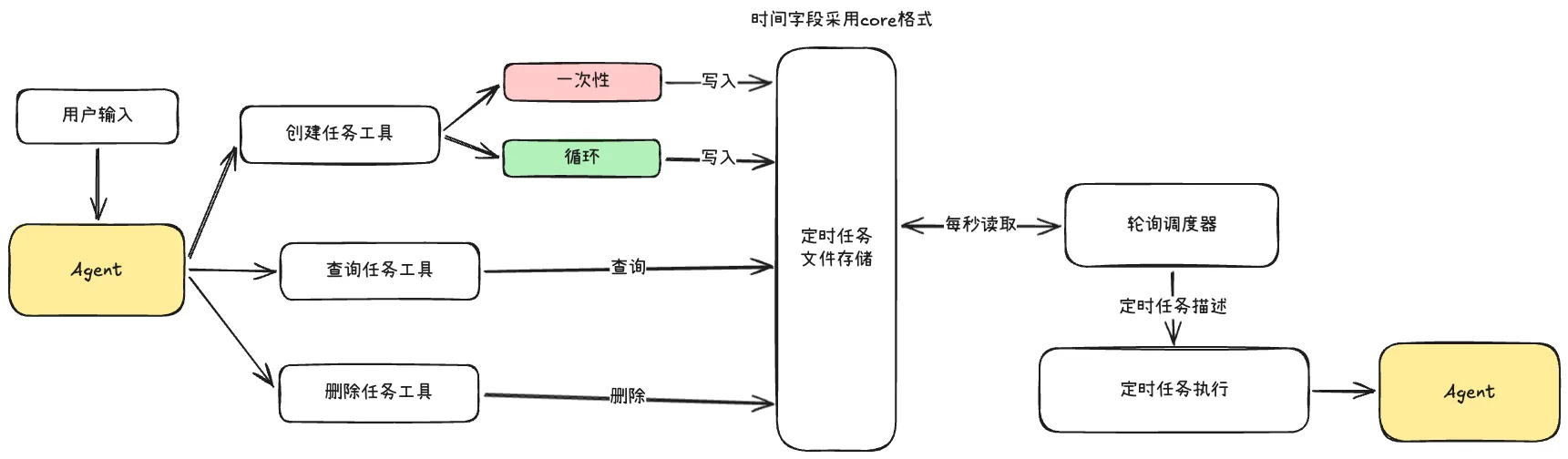
Task storage uses JSON format with cron-formatted time expressions:
NOTECron format easily expresses both one-time and recurring tasks with unified formatting for scheduling
Two task creation methods: user input and /loop command.
- User input: Model parses task time and instructions, calls the creation tool, writes to JSON
/loopcommand: More precise — constrains a complete time parsing rule, injects parsed input to the LLM, executes immediately on creation, and all tasks are recurring
/loop parsing rules:
- Leading interval: First space-separated number is the cron cycle time —
/loop 30m check deploy - Trailing “every”: If input ends with “every N”, N is the cycle time —
/loop run tests every 5 minutes - Default: If neither matches, default is 10 minutes
{
  "tasks": [
    {
      "id": "a1b2c3d4",
      "cron": "*/5 * * * *",
      "prompt": "Check deployment status",
      "createdAt": 1712830000000,
      "lastFiredAt": 1712830300000,
      "recurring": true
    }
  ]
}
For scheduler performance, consider caching: read cache every second, reload file every 5 seconds.
2. KAIROS Mode
ClaudeCode has a fascinating feature called KAIROS — transforming from interactive to always-on background mode, making the Agent proactive rather than passively reactive.
Kairos comes from ancient Greek, a philosophical concept about time meaning “the right moment, the critical instant.”
All tasks the Agent handles are unified into a queue, allowing users to “single-thread” focus on tasks. The background-running assistant operates without interrupting the user’s flow, proactively handling tasks at the right moments.
Queue tasks have priorities — not FIFO, but priority-based. User input has the highest priority.
KAIROS’s continuous operation isn’t controlled by simple while loops but by event-driven tick messages in context — very elegant.
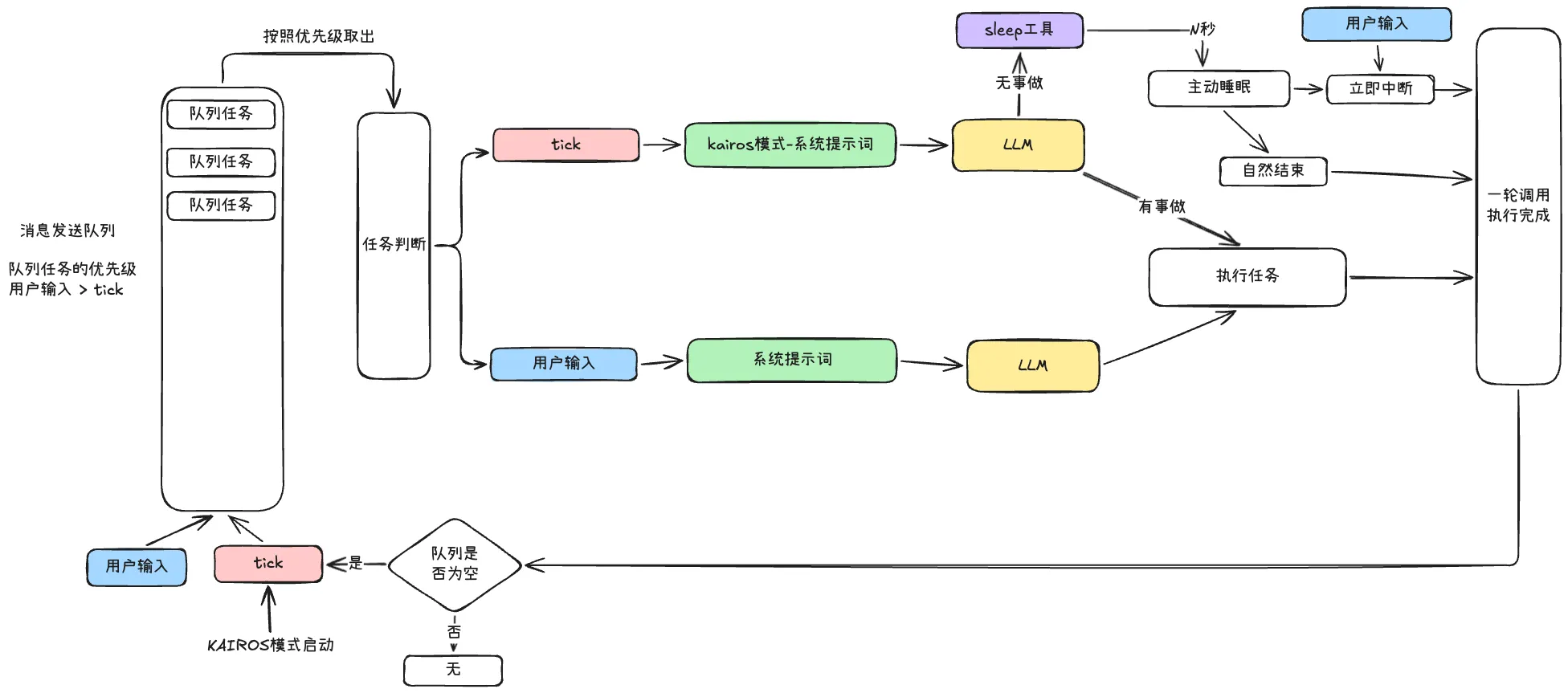
- Each Agent run: pull task from queue by priority, determine if it’s user input or KAIROS tick
- User input: normal processing flow — Claude calls tools and reasons over context
- Tick: switch to KAIROS-specific system prompt. Agent has two behaviors: execute tasks or sleep
- Execute tasks: like normal mode — run tests, explore unfamiliar code, do small refactors
- Sleep: When the model determines there’s nothing to do, it proactively enters “sleep state.” Sleep duration is decided by the model itself, implemented via a sleep tool. User input can interrupt sleep at any time — it’s a “first-class citizen” in the queue
- After any task completes or sleep ends, one round is finished
- Decision flow: if queue is empty, add a tick message; if not empty, proceed normally — this drives KAIROS’s continuous operation
Two design highlights I particularly appreciate:
First: Sleep State Implementation
Compared to scheduled tasks with fixed intervals (e.g., run every 30 minutes), that approach always felt somewhat forced — the “Agent proactivity” is really just user-configured scheduling.
In ClaudeCode’s design, when to sleep and for how long is entirely up to the model. Users just “turn on” the Agent.
- System prompt adds judgment: “When you find no tasks to do, call the sleep tool”
- Sleep tool has a
duration_msparameter controlled by the model
This design feels much more genuinely “proactive.”
export const SleepTool = buildTool({
    name: 'Sleep',
    description: 'Wait for specified duration, user can interrupt anytime',
    inputSchema: z.strictObject({
      duration_ms: z.number().nonnegative().int().describe('Sleep duration (ms)')
    }),
    interruptBehavior: 'cancel',
    async call({ duration_ms }) {
      await new Promise(resolve => setTimeout(resolve, duration_ms))
      return { data: { slept_ms: duration_ms } }
    }
  })
Second: Tick Messages
Tick is the trigger source for KAIROS’s event-driven loop. The mode runs continuously because after each task completion, a tick may be added to the queue — ensuring the queue always has a tick for the Agent to keep cycling.
A tick is essentially a message with a dynamic time variable:
<tick>14:20:15</tick>Injected into model context as a user message:
{"role":"user","content":"<tick>14:20:15</tick>"}KAIROS mode can serve as a paradigm for proactive Agent implementation. The core approach: Sleep tool + tick event-driven design.
This is more flexible than scheduled tasks, elegantly implemented, slightly more complex to develop (mainly queue state maintenance), but well worth trying if you want your Agent to run more proactively.