Designing Browser Use for Your Agent
There are many ways to let an Agent control a browser. You can embed a browser in your application (like Cursor and Codex), opening web pages within the app and using tool definitions for control. However, this approach can’t inherit the user’s full browser permissions or fully simulate user browser operations.
I prefer using browser extensions as intermediaries to control the user’s original browser. Extensions can use Chrome API interfaces to read and operate tabs, and CDP-provided APIs to simulate human browser use — clicking, downloading, viewing, typing, etc.
Agent browser operation is complex with many nuances. This article serves as a primer for understanding the overall approach, while CDP, CUA, and Playwright details require more hands-on practice.
Research references:
- open-browser-use: https://github.com/iFurySt/open-browser-use
- ActSpace: https://github.com/WakeUp-Jin/actspace-agent
- Notch Agent: https://github.com/Puggo1145/Notch-Agent
1. Core Implementation Approaches
Before implementing browser control, we need to understand the primitives for simulating human browser use:
NOTEPrimitives: viewing to confirm position, clicking, double-clicking, mouse movement, keyboard input, key presses, downloading, dragging, scrolling
Chrome DevTools Protocol provides APIs for these primitive browser operations.
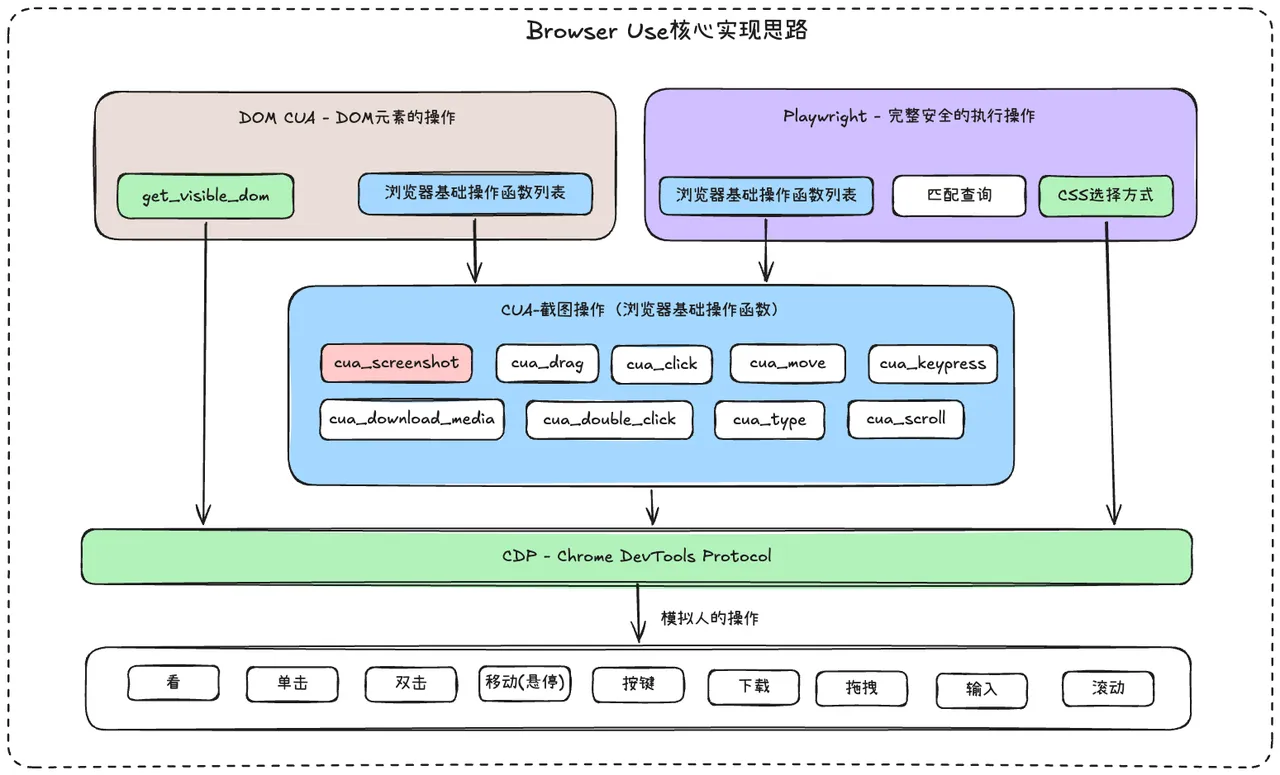
CUA (Computer Use Agent): The most critical aspect is the source of all operations — “seeing.” How does the Agent know which button to click and where it is?
In CUA, the core is: screenshots to determine coordinates. With coordinates confirmed, corresponding operations can be executed. This requires multimodal model capabilities — image recognition.
If the model lacks or has weak image recognition, we can use DOM CUA instead. Unlike CUA, DOM CUA doesn’t use screenshot analysis to determine operation positions — it uses the DOM to locate elements and executes operations via node_id.
The key method in DOM CUA is get_visible_dom, which retrieves all visible DOM elements on the page as JSON, providing the Agent with node_ids for operations.
Note: DOM CUA’s method for getting all DOM elements internally calls CDP’s native API, while other operations internally call pre-wrapped CUA functions.
Beyond DOM CUA, we can use the mature browser automation framework Playwright, which offers many pre-built, complete, and safe execution flows. It can also use CSS selectors as operation conditions — much more granular than DOM CUA.
-----Wait operation-------
CDP (DIY):
  Send Runtime.evaluate("document.querySelector('.result')")
  → If element hasn't loaded → returns null → fails
  → You must write while loops + sleep + retry + timeout handling

Playwright (auto-wait):
  wait_for(selector=".result", state="visible")
  → Internally auto-polls, checks state, handles timeouts
  → Only returns after element is truly visible
2. Integrating with Your Agent
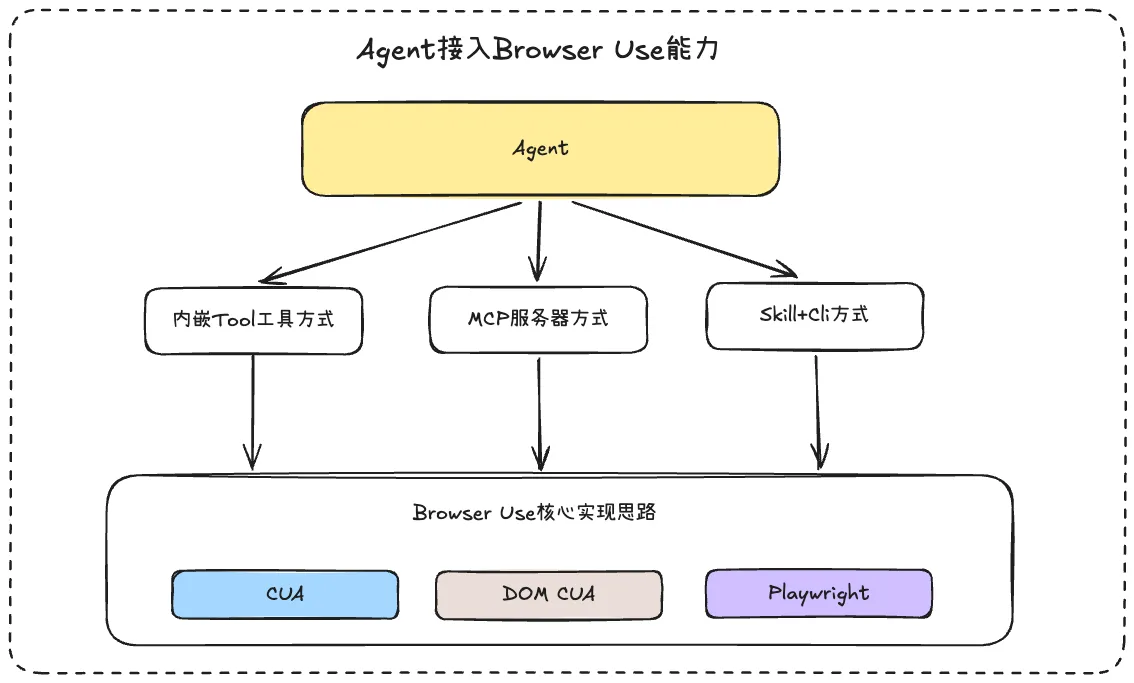
Three approaches:
- Embedded tools: Provide functions as a tool list for the Agent
- MCP server: Expose resource functions via MCP protocol
- Skill + CLI: Wrap functions as a CLI tool with a Skill as the “usage guide”
3. Complete Architecture Designs
Three application architectures with different focuses and use cases:
1. Codex’s Browser Use: Most logic lives in Browser-client.js (~2,700 lines). The Rust extension-host serves as a simple message relay.
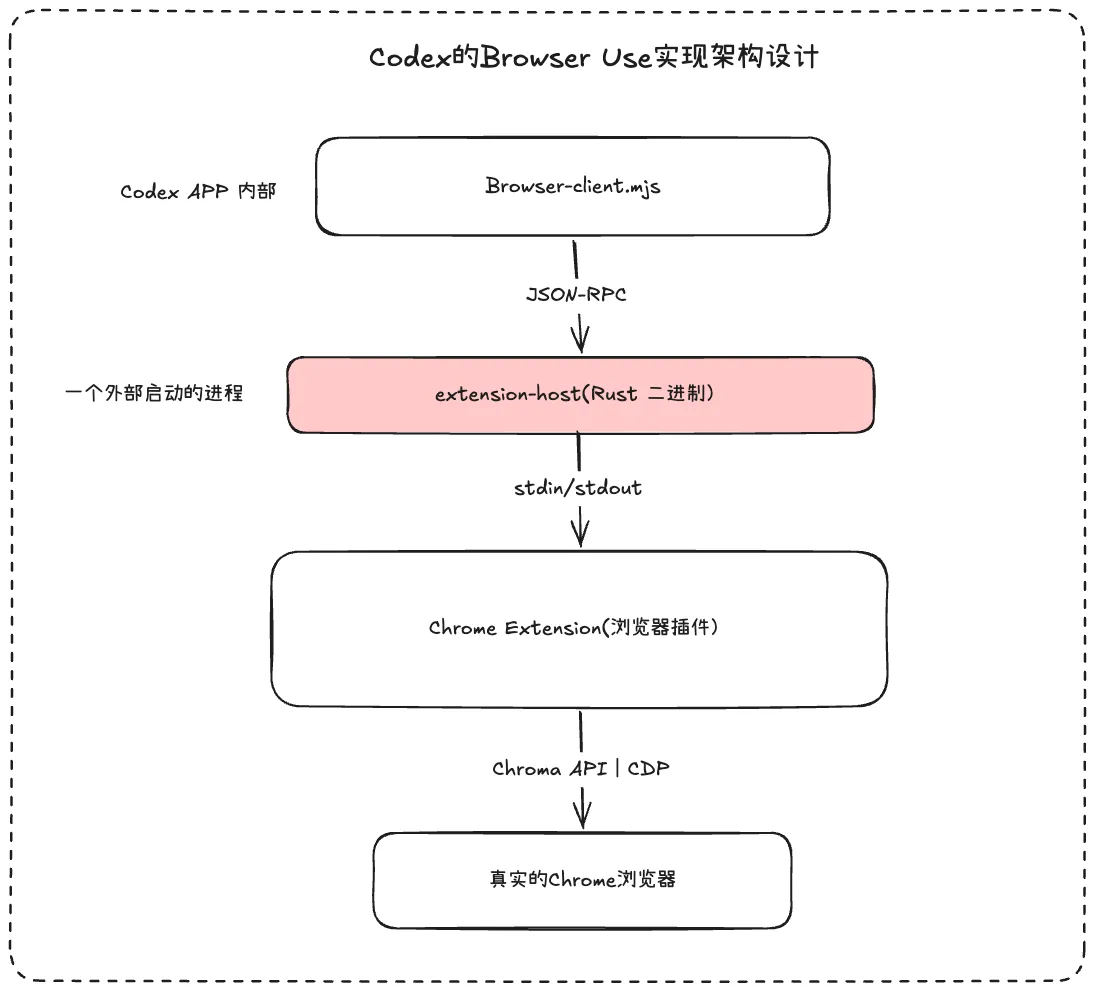
Notable interaction details: mouse movement has starting positions with smooth transition clicking, and Agent-created tabs are visually distinguished from user tabs.
2. Open-Browser-Use: Focuses on “open” — comprehensive caller support via Skill CLI, MCP connection, or direct SDK integration. Most business logic lives in the Go-based client.
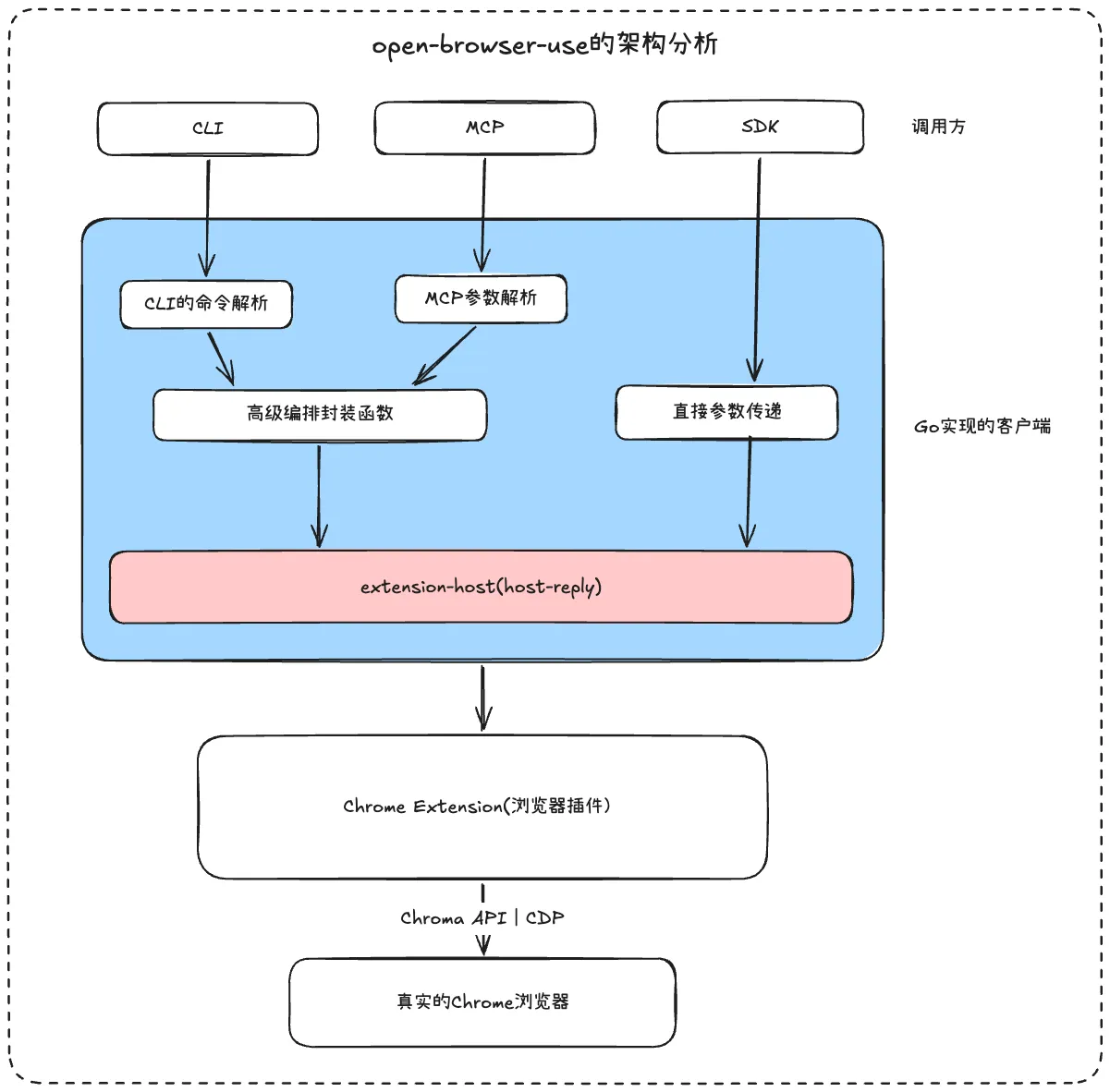
3. ActSpace’s Architecture: Drawing from both designs above, integrated directly into the project source code via a browser-tool file that defines what browser operations to provide to the Agent. The overall file is lightweight — just message forwarding and tool provision, without heavy business logic.
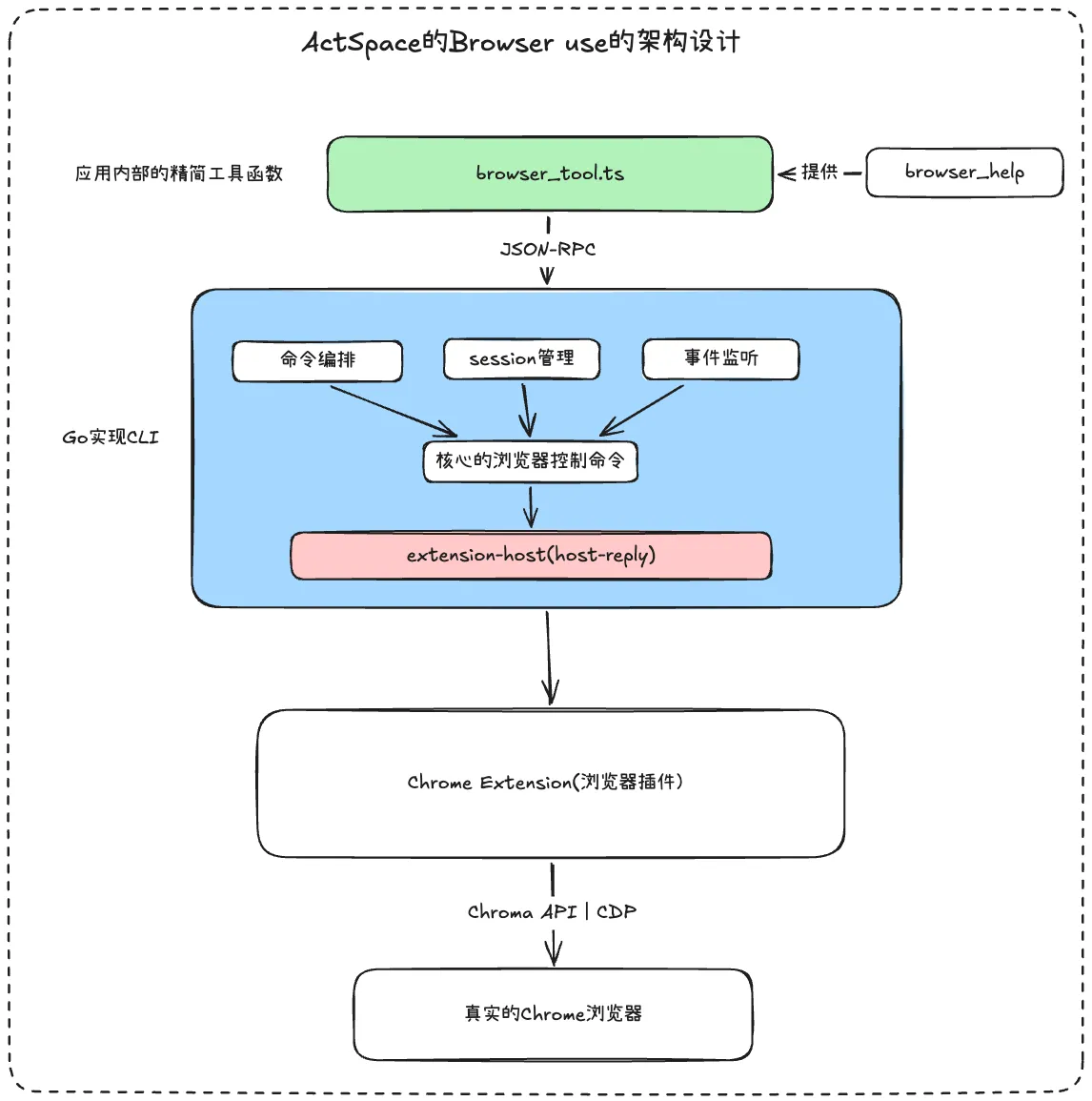
Core browser operation logic lives in the Go-based CLI, including browser extension connection processes. A useful detail: a browser_help command returns complete instruction descriptions and parameter details, greatly improving Agent accuracy when calling browser controls.