Agent Bash Tool Engineering: Background Execution and Sandbox Design
In the previous article, we covered the basic Bash tool design — good for demos or early project stages, but for production-grade Agent stability, two essential components are needed: background execution and sandbox design.
References:
- Previous article: “Bash Tool Implementation and Security Design”
- Anthropic’s lightweight sandbox tool: https://github.com/anthropic-experimental/sandbox-runtime
1. Context Management — Background Execution
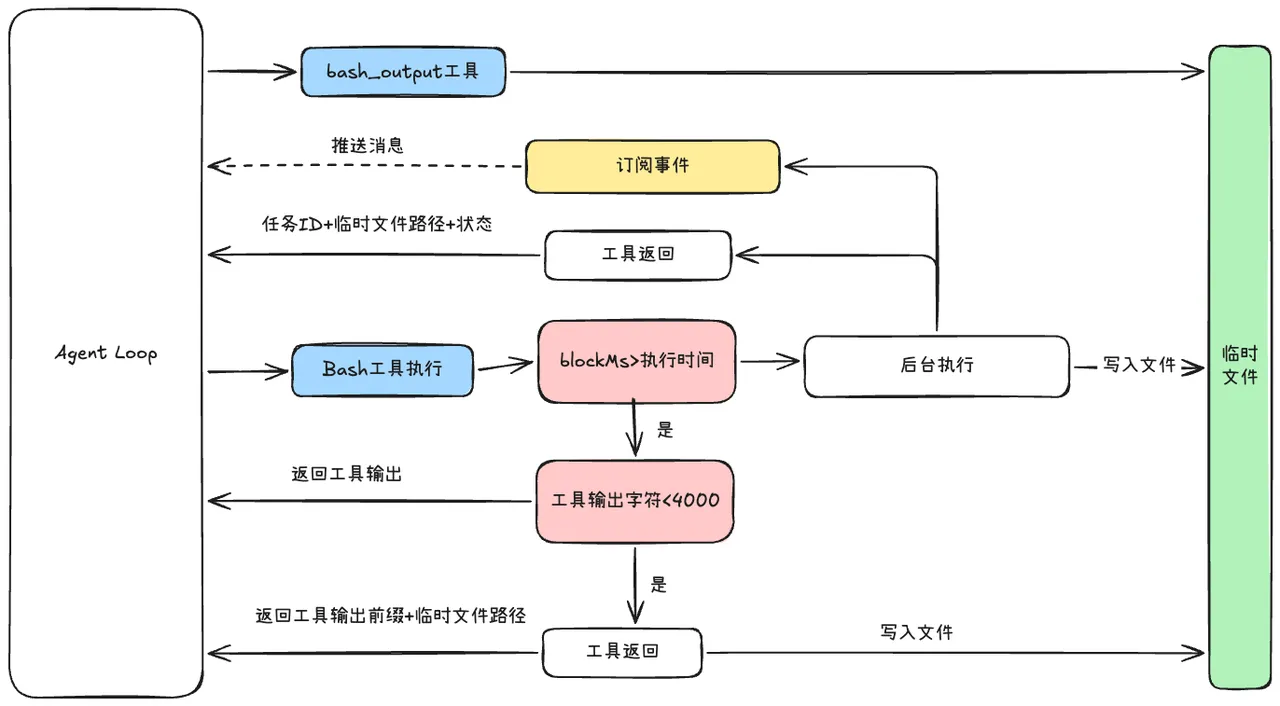
The Bash tool executes terminal commands. Some commands (like project startup) run for extended periods. Without a blockMs foreground time limit, the Bash tool execution would block. With blockMs, commands can be mounted to the background.
Additionally, terminal read commands might read large files. Bash tool output is limited — when exceeding a threshold (currently 4000 characters), results are written to a temporary file, and the file path is returned. The model automatically reads via appropriate tools when needed.
Two key design points: background mounting and temporary file writing
Temporary file writing prevents memory overflow and improves context efficiency — only necessary information enters context, read only when needed.
Background mounting — the critical question is: how does the model access background command execution status? While the model could proactively read the file path, this is inefficient. So we designed incremental reading tool
bash_outputand event-driven push notifications.
The incremental reading tool bash_output efficiently returns delta information (not full file content) plus background task status, giving the model better task awareness than a generic read tool.
Event-driven push: Each time Bash output is written to the temporary file, a rule check triggers (regex or state-based). When conditions match, that output segment is pushed into the next turn’s context.
NOTEWe don’t use model-driven polling for task status — too inefficient. Instead, the task side proactively pushes when conditions are met.
2. Sandbox and Permission Design
Sandbox and permission design have different focuses:
- Permission design: Should this command need user review? Can it execute?
- Sandbox design: After execution, how much damage can it do? Ensuring execution safety as a last line of defense.
On macOS, use the built-in sandbox mechanism with a Profile syntax file:
TIPSimply prefix command execution with
/usr/bin/sandbox-exec -f profile.sbto start the process. Constraints are enforced by the kernel and automatically inherited across the entire process tree.
The complete three-layer design: first intercept known dangerous commands, then execute in sandbox. If sandbox execution fails due to permission restrictions, enter real environment execution — but always ask the user first.
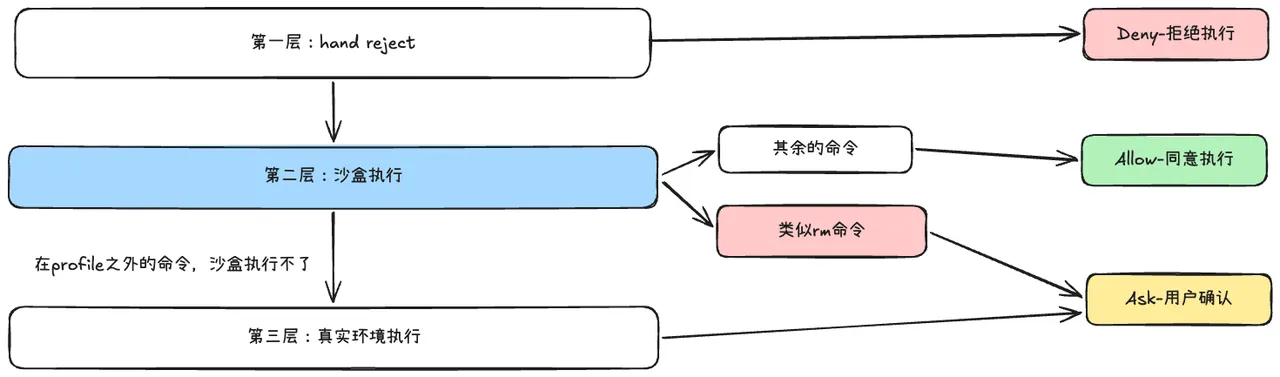
When the sandbox fails due to permissions, transform the failure signal — otherwise the Agent sees EPERM errors and assumes the command itself is wrong, not that sandbox permissions are insufficient. Add a hint: “This may be blocked by the sandbox, not a command error.”